

Workflow optimization with AI starts by examining the outcome a process must produce, the handoffs involved, and the evidence behind proposed changes. A useful pilot tests whether a specific change improves cycle time, quality, or capacity after accounting for implementation and operating costs. Payback depends on the workflow and results; it is not guaranteed within a fixed period.
TL;DR:
Focusing on outcome-driven workflow redesign with AI significantly reduces handoffs and review cycles, leading to faster, more impactful results.
Prioritize processes with high frequency, high outcome importance, low context loss, and good data quality to maximize ROI and adoption chances.
Estimate potential benefit using your own baseline, then compare measured results and total costs. Published returns from other organizations are context, not a forecast for your project.
Strong governance, including permissions, observability, rollback, and human-in-the-loop gates, is essential for safe and scalable agentic workflows.
Orchard can help investigate activity, software usage, and repeated work within the systems and scope made available. Confirm evaluation timing and required governance controls for your own use case.
Table of Contents
What Is Workflow Optimization With AI?
Workflow optimization with AI means restructuring a full sequence of work, start to finish, so that AI agents and automated systems handle the routine transformations and humans intervene only where judgment genuinely matters. It’s a different discipline from task automation. Task automation asks “can AI do this one step faster?” Workflow optimization asks “what outcome are we actually trying to produce, and how few handoffs does it take to get there?”
The technical stack behind this shift usually includes several components working together:
-
Agents — software that can plan, act, and adjust across multiple steps rather than executing one fixed script
-
Generative AI and large language models — for drafting, summarizing, and interpreting unstructured input
-
Machine learning models — for prediction, classification, and anomaly detection
-
Natural language processing (NLP) — to parse emails, tickets, contracts, and other text-based inputs
-
Optical character recognition (OCR) — to pull structured data out of scanned documents and PDFs
-
APIs and integration layers — to connect the AI logic to the systems of record it needs to read from and write to
-
Orchestration or control planes — the layer that sequences agent actions, enforces guardrails, and logs what happened
Multi-agent systems, where several specialized agents hand work to one another under a shared orchestration layer, are becoming the default architecture for anything beyond a single narrow task. That architecture is precisely what makes workflow-level thinking necessary instead of optional.
Why Does Redesigning the Whole Workflow Beat Automating One Task?
Because most of the wasted time in a business process isn’t inside any single task. It’s in the handoffs between tasks. Research from MIT Sloan on how AI is reshaping workflows finds that value emerges at the workflow level, not the task level, and that coordination costs, the friction of passing work between people and systems, matter more than shaving seconds off a single step.
Clustering AI-friendly tasks into outcome-driven sequences tends to outperform chasing marginal accuracy gains on any one micro-step, even when the AI isn’t perfect at every stage.
The number that should reset your priorities: a process with five handoffs rarely fails because any one step is slow. It fails because each handoff introduces a review, a wait, or a re-explanation of context. Fix the handoffs and the individual task speed matters far less.
BCG’s research on agentic enterprise operations makes the same point from a different angle: companies that retrofit AI into a linear, human-centric process get modest gains. Companies that rearchitect the process around agentic, outcome-driven execution get structurally different results, because the AI isn’t just doing a step faster, it’s removing the step’s need for a handoff at all. That’s the agentic AI framing in practice: design for the outcome first, then decide which parts of the sequence an agent can own end to end.
What Return Can You Actually Expect?
Set expectations from your own baseline before pitching a project. Reported payback periods in external studies describe their samples and assumptions; they do not establish a six-to-12-month expectation for every AI workflow. Include implementation effort, ongoing costs, adoption, exceptions, and the timing of benefits in your model.
What this looks like by function:
-
Customer operations — faster resolution and fewer escalations when an agent handles the first triage pass and routes only genuine exceptions to a person
-
Supply chain — tighter forecast-to-order cycles when agents reconcile demand signals across systems instead of a planner doing it manually
-
HR — shorter time-to-fill and fewer manual data re-entries when onboarding and requisition workflows are redesigned end to end
External research can help frame questions about AI adoption and workflow redesign, but reported productivity uplifts and ROI multiples use different samples and definitions. Build a range of scenarios for your own workflow and label the assumptions. Separate estimated labor capacity value from actual reductions in spending, and use pilot results to revise the model before scaling.
How Do You Pick Which Workflow to Fix First?
Not every process deserves the same attention. Prioritize using four criteria, in this order:
-
Outcome importance — does fixing this workflow move a metric leadership actually cares about, like cycle time, error cost, or customer churn?
-
Frequency — how often does this workflow run? High-frequency processes compound savings fast; rare ones rarely justify the build cost.
-
Context loss — how much information gets lost or re-explained at each handoff? Heavy context loss is a strong signal that agentic orchestration will help.
-
Data readiness — is the data this workflow depends on structured, accessible, and clean enough for an agent to act on without constant human correction?
Once you’ve picked a candidate, design the pilot narrowly. Define one specific outcome the pilot must hit, not “improve efficiency” but “cut invoice processing time from five days to one.” Build guardrails before you build the automation: what happens when the agent encounters something it hasn’t seen? Instrument observability from day one so you can see every decision the agent made, not just the final output. And write a rollback plan before launch, not after something breaks.
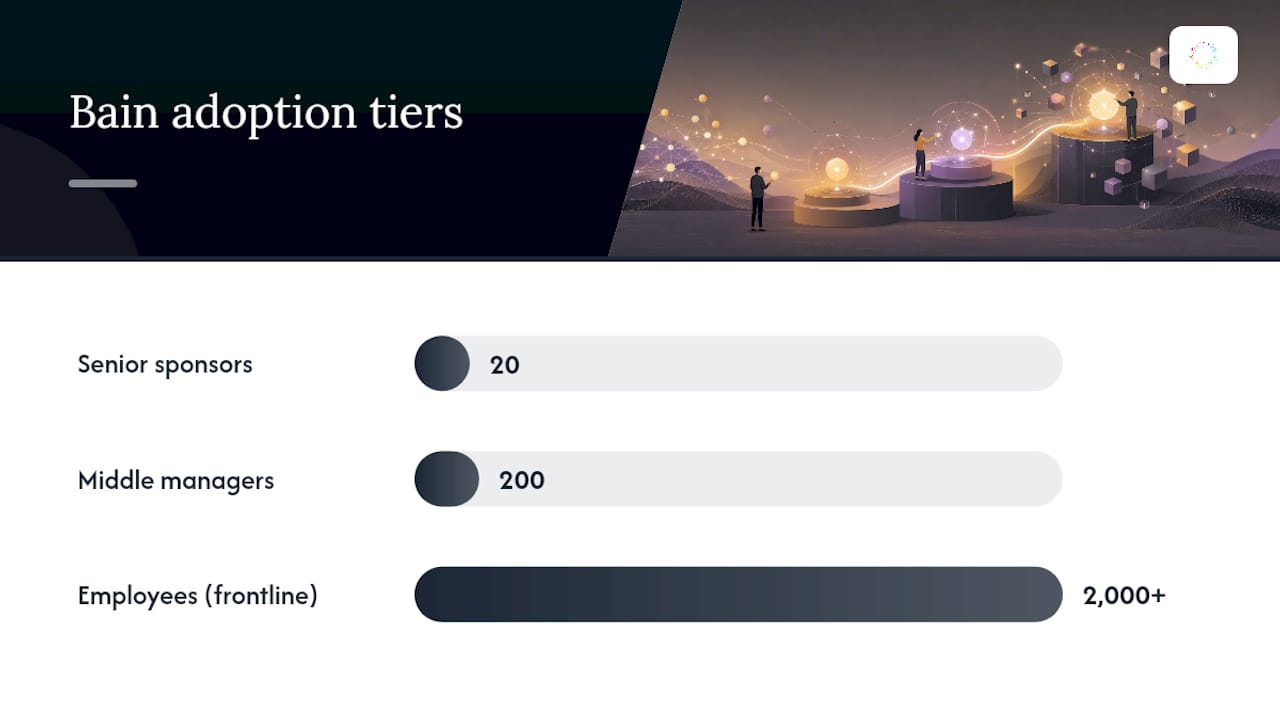
Scaling from pilot to enterprise-wide use runs through three mechanics. First, a Center of Excellence (COE) that owns standards, reusable components, and cross-team learning. Second, a deliberate build-versus-buy decision for each workflow rather than a blanket policy. Third, Bain’s 20/200/2,000 adoption framework: 20 senior sponsors set direction, 200 middle managers translate that direction into daily operations, and 2,000-plus employees actually change how they work. Most redesigns that stall, stall in that middle layer.
Pro Tip: Run your first pilot on a workflow with high frequency but moderate stakes. You want enough repetitions to generate a clean signal within weeks, without betting your riskiest process on version one of your governance model.
Which Metrics Actually Prove the Workflow Is Working?
Track two categories side by side. Outcome KPIs tell you whether the business result is improving. Health metrics tell you whether the underlying system is stable enough to trust.
Outcome KPIs:
-
Payback period calculated from your own incremental costs and attributable benefits, with assumptions and uncertainty stated
-
Time saved per cycle and overall throughput
-
Error and rework rate reduction
-
EBITDA or margin uplift, where the workflow touches revenue or cost directly
Health metrics:
-
Agent success rate on defined tasks
-
Handoff latency between agent and human steps
-
Data-quality score feeding the workflow
-
Decision-rights adherence, whether exceptions are actually routed to the right human
Review these weekly during the pilot phase and monthly once scaled. A dropping agent success rate or rising handoff latency is an early warning sign that shows up in the health metrics well before it shows up in the outcome numbers.
What Controls Keep an Agentic Workflow Safe?
Agentic systems that act across multiple steps need real controls, not a one-time approval. The essentials:
-
Permissions — agents should hold the minimum access needed for their specific task, nothing broader
-
Memory hygiene — clear rules for what an agent retains between runs and what it must discard
-
Observability and logging — a complete record of every decision and action an agent took, searchable after the fact
-
Rollback capability — a tested way to undo an agent’s actions when something goes wrong
-
Human-in-the-loop gates — mandatory checkpoints for high-stakes decisions, not optional ones
Assign ownership explicitly. An “agentic process owner” should be accountable for the workflow’s end-to-end outcome, not just the AI component, backed by a Center of Excellence that maintains standards across every deployed workflow. For a practical governance baseline, the NIST AI Risk Management Framework gives organizations a structured way to assess and manage AI-specific risk without building a framework from scratch. As workflows scale, an agent registry with managed identities and automated drift detection prevents the kind of agent sprawl that turns a clean pilot into an unmanageable mess a year later.
Where Do Most AI Workflow Projects Actually Fail?
Rarely at the technology layer. Almost always at the coordination and adoption layer.
-
Excess review loops — if every agent action still requires a human sign-off, you’ve automated the task but kept the coordination cost, which defeats the purpose
-
The 200-person handoff gap — middle managers are frequently handed a new workflow with no playbook and no coaching on how to run it, and Bain’s research identifies this as the most common point of failure in AI redesigns
-
Poor data readiness — launching a pilot on messy, inconsistent data guarantees the agent produces messy, inconsistent output
-
Scope creep — a pilot that keeps absorbing “just one more use case” before it’s proven the first one
-
Shiny object risk — chasing the newest model or agent framework instead of fixing the workflow that’s actually losing money
Pro Tip: Before you scale anything, ask whether your middle managers could explain the new workflow to a new hire without referencing a slide deck. If they can’t, you have an adoption gap, not a technology gap.
Reducing human validation steps to only genuine exceptions, rather than routing everything through a person, is one of the more reliable ways to cut coordination costs without cutting oversight where it matters.
How Orchard Applies This Playbook in Practice
Orchard helps organizations understand employee activity, software and AI usage, workload patterns, and workflow bottlenecks across teams and applications. Those observations can help process owners investigate where repeated work or difficult handoffs deserve closer review.
Isaac helps leaders investigate business questions using available activity and evidence, while Studio provides custom dashboards and views. Treat those findings as inputs to a process review, and verify the controls needed for any proposed automation before enabling it.
-
Findings depend on the systems, activity, and scope made available
-
Teams can identify repeated work and choose which automations to enable
-
Completed runs are tracked with estimated time and labor value saved; these estimates are not verified spending reductions or guaranteed savings
-
Required approval, rollback, and access controls should be confirmed for the specific workflow and execution systems
Security and data handling details are laid out on Orchard’s dedicated trust page, which matters if you’re the person who has to answer for how workflow data gets captured and stored.
What Data Privacy and Ethics Issues Come With This?
Workflow-level AI touches more sensitive data than task-level automation does, simply because it sees an entire process rather than one input field. That raises the stakes on a few specific issues.
Data minimization and retention matter more once an agent has memory across sessions. An agent that remembers a customer’s prior complaints to personalize service is useful; an agent that retains sensitive personal or financial details longer than the workflow requires is a liability. Memory hygiene policies should specify retention windows explicitly, not leave them to default settings.
Consent and transparency become harder to manage when a workflow spans multiple systems and, often, multiple companies (a vendor, a customer, an internal team). Employees and customers whose data flows through an agentic workflow deserve to know when a decision affecting them was made or influenced by AI, particularly in HR, lending, or customer service contexts where the outcome has real consequences for a person.
Bias propagation is a workflow-level risk, not just a model-level one. If an agent’s decision at step two feeds into step five without human review, a biased judgment early in the sequence compounds rather than gets caught. This is exactly why human-in-the-loop gates at high-stakes decision points matter more than blanket human review of everything.

The practical takeaway: privacy and ethics reviews belong in the pilot design phase, alongside the guardrails and rollback plan, not as a compliance check bolted on right before launch.
How Do You Handle Integration With Existing IT Systems?
Agentic workflows are only as good as their connections to the systems of record they touch, and that’s where most implementation friction actually lives.
Legacy systems without APIs are the most common blocker. Older ERP or CRM platforms weren’t built with agent access in mind, which forces teams to choose between building custom connectors, using screen-based automation as a bridge, or accepting a partial integration that still requires manual steps at the edges. None of these is wrong. The right choice depends on how long that legacy system is expected to stick around.
Data silos across departments create a subtler problem: an agent trying to optimize a workflow that spans sales, fulfillment, and finance may need read or write access to three systems owned by three different teams with three different security postures. Resolving this usually requires the Center of Excellence to broker access agreements up front, rather than letting each project team negotiate its own.
Security review timelines frequently underestimate how long it takes IT and security teams to approve a new agent’s access scope, especially in regulated industries. Build that review into your pilot timeline from the start rather than treating it as a late-stage surprise that stalls a working pilot for weeks.
The orchestration or control plane sits above all of this, which is precisely why choosing one with solid observability and permission scoping up front saves months of retrofitting later.
What Should Leaders Actually Do First?
Most teams overthink the starting move. Three things matter more than the rest: map your highest-value outcome workflows before you touch any tooling, instrument the KPIs from day one so you have a baseline, and name an agentic process owner before the pilot launches, not after.
Governance isn’t a phase-two concern. Bake permissions, observability, and rollback into the pilot design itself. For the first 30 to 90 days: pick one workflow using the four criteria above, define the single outcome it must hit, and review health metrics weekly. Everything else can wait.
— Katie
Get Started With AI-Driven Workflow Optimization
Start with one workflow and a clear question: where is work repeated, which handoffs create delays, or how are teams using software and AI? Orchard can help investigate these questions using available activity and evidence, giving process owners a starting point for validation.

Use the findings to define a testable improvement, establish a baseline, and review the scope with the people performing the work. Confirm required permissions, oversight, and exception handling before enabling an automation. Evaluate estimated capacity value separately from actual spending changes.
Request an Orchard briefing to discuss your workflow, the available evidence, and an appropriate evaluation scope.