

Swivel chair automation eliminates the manual copy-and-paste work employees do when moving data between disconnected systems, replacing it with automated, auditable workflows. It cuts the time spent on repetitive handoffs, reduces the errors that come from re-keying data by hand, and gives operations teams a measurable path to ROI once they know what to audit, which automation approach fits, and how to run a pilot.
TL;DR:
Prioritize frequent, well-understood tasks with manageable exceptions, and validate the business case with your own baseline.
Tasks involving legacy systems without APIs typically require capture-based automation, which is more flexible in these scenarios.
Run a scoped pilot on one or two candidate tasks with agreed success measures and a timeline that covers representative work.
Automations must be monitored and governed with designated ownership to prevent silent failures and ensure ongoing accuracy.
Mapping system compatibility and understanding security, maintenance, and pricing details upfront can prevent costly vendor and architecture missteps.
Table of Contents
What Is Swivel Chair Automation, and Where Does It Show Up?
The name comes from the literal motion: an employee swivels between two screens, reading data on one and retyping it into the other, because the two systems don’t talk to each other. No robot arm is involved. It’s a person acting as the connective tissue between software that should be connected but isn’t.
This shows up constantly in mid-size and large organizations. A support rep closes a ticket in Zendesk, then logs into the CRM to update the account record by hand. A billing clerk pulls numbers from a legacy ERP and retypes them into a spreadsheet for the finance team. A field technician finishes a job on a tablet, then someone back at the office transcribes the notes into a scheduling system.
Common places to look for it:
-
Customer support teams updating CRM records after every ticket
-
Accounts payable staff moving invoice data between ERP and banking portals
-
HR teams re-entering new-hire data across payroll, benefits, and directory systems
-
Field service teams transcribing paper or tablet notes into dispatch software
-
Sales operations reconciling CRM data with spreadsheets for reporting
If a task involves two open windows, a keyboard, and zero decision-making, it’s a swivel chair candidate.
How Much Is Swivel Chair Work Actually Costing You?
Guesswork kills automation budgets before they get approved. The fix is a simple audit: track frequency, minutes per instance, and error rate for a handful of suspected swivel chair tasks over two weeks.
For an illustrative baseline, a task performed 200 times a week at four minutes per instance consumes about 13.3 hours. This is time currently spent, not a promise that automation will recover all of it. Account for exceptions, review, and maintenance when estimating the potential benefit.
By the numbers: Many companies have already implemented software or AI to automate manual tasks, according to a survey covered by Reworked, and CFO-level attention to these investments is confirmed by Richmond Fed survey data from 2024. Swivel chair work isn’t a fringe inefficiency; it’s mainstream enough that finance leadership is already watching it.
Metrics worth tracking for your business case:
-
Frequency (instances per day or week)
-
Average minutes per instance, including context-switching time
-
Error or rework rate tied to manual re-entry
-
Annualized labor cost once you multiply hours by loaded wage
Academic and practitioner commentary also connects repetitive manual handoffs to higher error rates and burnout among the employees doing them, which matters when you’re pitching this to leadership as more than a productivity line item.
What Are the Main Ways to Automate Swivel Chair Tasks?
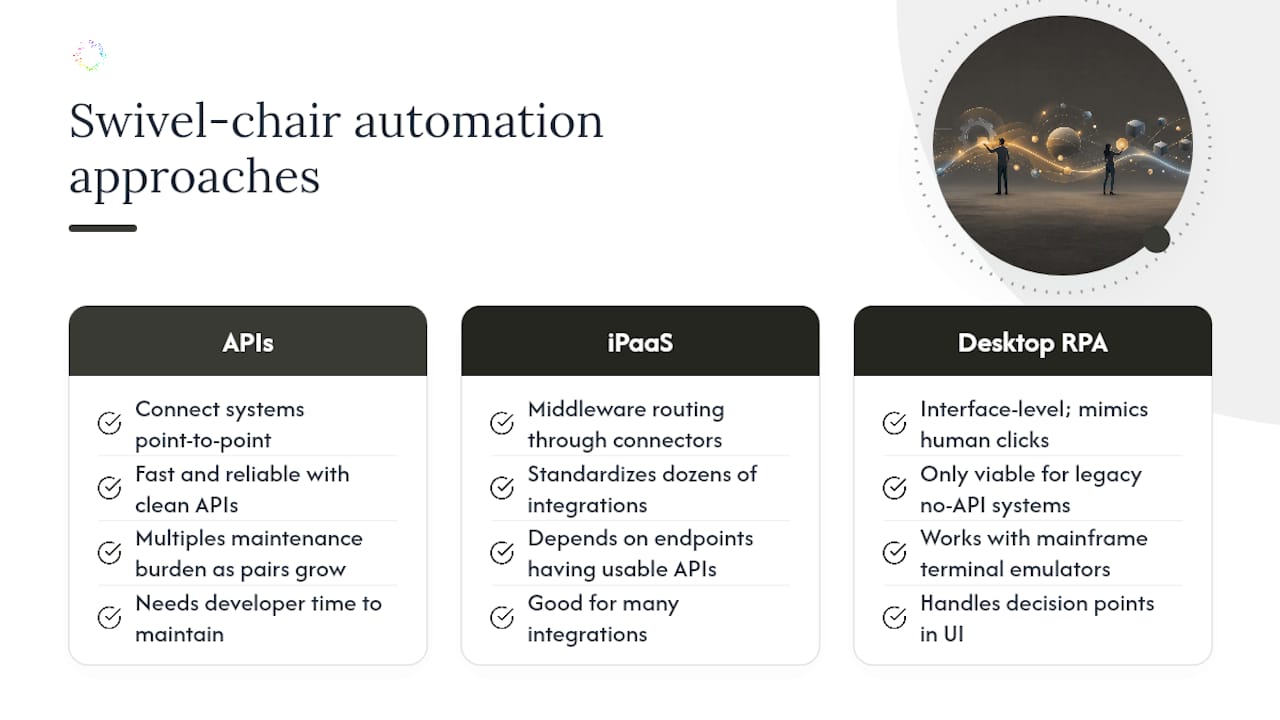
Four broad approaches solve this problem, and picking the wrong one is the most common reason automation projects stall.
Direct API integrations connect two systems point to point. Fast and reliable when both platforms expose clean APIs, but they multiply maintenance burden as you add more system pairs.
iPaaS and middleware platforms sit between multiple systems and route data through pre-built connectors. Good for standardizing dozens of integrations, though they still depend on each endpoint having a usable API.
Desktop automation, sometimes called capture-based automation or RPA, works at the interface level, mimicking what a human does on screen. This is the only viable option when you’re dealing with legacy software that has no API, a mainframe terminal emulator, or decision points that only exist in someone’s head as they click through screens.
Orchestration layers coordinate multiple automations and systems together, useful once you have several individual automations running and need to sequence them.
Capture-based desktop automation earns its place specifically because so much swivel chair work happens in old, undocumented systems. A hospital scheduling tool from 2009, a regional carrier’s proprietary claims portal, an internal tool nobody has the source code for anymore, these don’t have APIs to call. Capture works anyway, because it watches the screen instead of asking the backend for data.
A common hybrid pattern: use capture-based automation to handle the desktop steps in a legacy claims system, then push the extracted data to the modern CRM via API once it’s captured. You get the reach of desktop automation and the speed of API sync in the same workflow.
Pro Tip: Before choosing a tool, map which systems in your swivel chair task actually have APIs and which don’t. That single distinction usually decides your architecture faster than any vendor demo will.
Trade-offs to weigh: API integrations need developer time to build and maintain; desktop automation needs monitoring because UI changes can break it; all approaches need someone responsible for handling exceptions that fall outside the expected pattern.
Which Tasks Should You Automate First?
Not every swivel chair task deserves automation, and treating them all the same is how pilots fail. Run this audit before you buy anything.
-
Map the task end to end. Document every screen touched, every system involved, and who performs each step.
-
Flag every decision point. Note exactly what data determines whether the process branches one way or another.
-
Measure the exception rate. Track how often the task deviates from the standard path over a two to four week window.
-
Calculate value per action. Multiply frequency by time saved and loaded labor cost to get a rough annualized number.
-
Check data sensitivity. Confirm whether the task touches regulated data (health records, payment details, personal information) that needs extra controls.
Tasks with high frequency, low exception rates, and predictable decision trees automate cleanly. Experts recommend mapping decision points explicitly rather than assuming a process is simpler than it actually is, because that’s where most automation projects run into trouble later.
Red flags that predict a failed automation attempt:
-
Task frequency is too low to justify the setup cost, even if it’s annoying
-
Exception rate exceeds roughly 20 to 30% of instances, meaning the “simple” task is actually several different tasks
-
The decision logic lives entirely in one person’s judgment and has never been written down
-
The underlying systems change frequently, breaking any automation built against them
What Should You Ask Automation Vendors Before You Buy?
Vendor selection is where good intentions meet bad contracts. Ask specific questions instead of accepting generic pitches.
On compatibility: does the platform offer a real connector library for your core systems, direct API access where needed, and the ability to read and act on desktop interfaces when no API exists? A vendor that only does one of these will leave gaps.
On security: how is data encrypted in transit and at rest, what does the audit trail actually log, and who controls access permissions? These questions matter enough that Orchard publishes its own security and data handling practices rather than leaving it to a sales call.
On operations: who owns maintenance when an automation breaks, what does error handling look like when an exception hits, and what SLA backs the platform’s uptime?
On commercial terms: watch for per-seat versus per-workflow pricing, minimum spend commitments, and whether a pilot is available before a long-term contract. A vendor unwilling to run a scoped pilot is telling you something.
How Do You Roll Out Automation Without Breaking Trust?
Scope small, measure everything, and bring the people doing the work into the process from day one.
-
Scope a pilot around one or two tasks with agreed KPIs, such as manual effort, error rate, and cycle time. Choose a duration that captures representative volume and exceptions.
-
Involve the employees doing the task today. They know the exceptions and edge cases that never made it into any process document, and skipping this step is how automations miss real-world cases.
-
Set up governance before you scale. Assign an owner for maintenance, define a rollback plan if something breaks, and decide who monitors performance weekly.
-
Build a continuous improvement loop. Treat automation like an ongoing backlog rather than a one-time project, expanding scope only after the pilot proves stable.
Employee involvement and continuous optimization separate automation programs that scale from ones that stall after the first win. Buying a tool is the easy part; keeping it accurate as systems and processes shift is the actual job.
Pro Tip: Assign one person from operations and one from IT as joint owners of every live automation. Split ownership between departments is the single most common reason automations quietly break and nobody notices for weeks.

How Does Orchard Find and Automate Swivel Chair Work?
Orchard helps teams investigate repeated effort and handoffs through employee activity and workforce analytics. Use the evidence available across your chosen systems and scope to identify where a swivel-chair task may deserve closer examination.
That capture-based approach matters because teams routinely miss swivel chair tasks that live entirely inside desktop applications with no API to query, the exact environments where API-first tools come up empty.
Use Isaac to investigate a candidate workflow and Studio to review relevant activity. Your team chooses which supported automations run and where review is required. Completed runs support estimates of time saved and labor-capacity value; validate outcomes and actual spending changes separately. Request an Orchard briefing to discuss your workflow and requirements.
Where it fits best:
-
Desktop-heavy workflows spanning multiple legacy applications
-
Systems with no usable API, or APIs that don’t expose the fields you actually need
-
Teams that don’t have the process already mapped and don’t want to map it manually first
Three Moves Operations Leaders Should Make This Quarter
If you take one thing from this, prioritize the swivel chair tasks with the highest frequency and highest error rate first. Everything else is secondary to that filter.
Second, run a scoped pilot with a cross-functional team, representative transactions, and KPIs agreed before the results arrive. Set its duration around the work and risks being tested.
Third, build governance before you scale past the pilot. Decide who owns maintenance and how you’ll measure success on a recurring basis, because the automation that isn’t monitored is the one that quietly breaks first.
— Katie