

Use an API when a documented endpoint provides the fields and reliability you need. Use screen scraping only as a pragmatic fallback for legacy systems, UI-only data, or one-off extraction tasks. In the screen scraping vs API decision, APIs win on reliability, security, and long-term maintenance almost every time. The rest of this guide gives you the checklist and security details to back that call up.
TL;DR:
A documented API may provide a more stable integration contract than a changing interface, but reliability depends on the provider and implementation; check actual service commitments and monitoring.
Using an API with scoped, revocable tokens reduces security risks and simplifies credential management compared to storing user passwords for scraping.
When no API exists, plain HTML scraping is more stable than full headless browser rendering, but it requires ongoing selector upkeep.
Screen scraping should be a last resort for UI-only data, legacy systems, or temporary tasks, with monitoring and alerts essential to catch failures early.
Regulatory and legal trends increasingly favor standardized, secure data transfer methods over credential-based scraping, especially in finance.
Table of Contents
Screen Scraping vs API: What Screen Scraping Actually Reads
Screen scraping pulls data from a page or application the way a human sees it, not from a database or a clean data feed. That means reading rendered HTML after JavaScript executes, sometimes parsing pixels via optical character recognition (OCR) for PDFs and scanned documents, and occasionally driving UI automation directly through clicks and keystrokes. It’s a different job than plain web scraping, which grabs the raw HTML or JSON straight from the source before rendering even happens. Screen scraping is what you reach for when the data only exists after a page finishes loading, after a login wall, or inside a legacy desktop terminal that has no export or feed to speak of.
Running it reliably at any scale requires real infrastructure, not a quick script:
-
Headless browsers like Playwright or Selenium to render pages the way a real user’s browser would
-
Proxy rotation to avoid IP blocks and rate limiting
-
Session and cookie management to stay logged in across requests
-
CSS or XPath selectors that need constant upkeep as page layouts shift
-
Monitoring and alerting to catch silent failures before they cascade downstream
What an API Actually Guarantees You
An API returns structured data, usually JSON, REST, or GraphQL, under a documented contract that specifies exactly what fields you get and what they mean. That contract is the entire point. You’re not guessing at what a <div> contains; you’re reading a schema someone committed to supporting.
Authentication is the other half of the story. Modern APIs use OAuth 2.0 with scoped, revocable tokens instead of asking you to store a user’s actual password. A detailed breakdown of OAuth scopes shows why scoping matters: a token limited to “read transactions” can’t also delete an account, even if the credential leaks.
Beyond auth, APIs come with operational guardrails that scraping simply doesn’t have:
-
Rate limits and quotas that are documented, not discovered the hard way
-
Versioning, so a provider can evolve without silently breaking your integration overnight
-
Standardized error codes (401, 429, 500) that tell you exactly what went wrong
-
Built-in monitoring hooks and status pages maintained by the provider, not you
Reliability, Security, Maintenance, and Cost, Side by Side
The gap between these two approaches isn’t philosophical. It shows up in uptime numbers, security posture, and how often your on-call engineer gets paged.
Reliability is the clearest differentiator. Stripe reports that API-based connectivity can hit reliability rates as high as 99.9%, backed by predictable error semantics and a schema that doesn’t shift under you. Scraping has no such floor. A single frontend redesign, an A/B test, or a new bot-detection layer can take your pipeline down with zero warning.
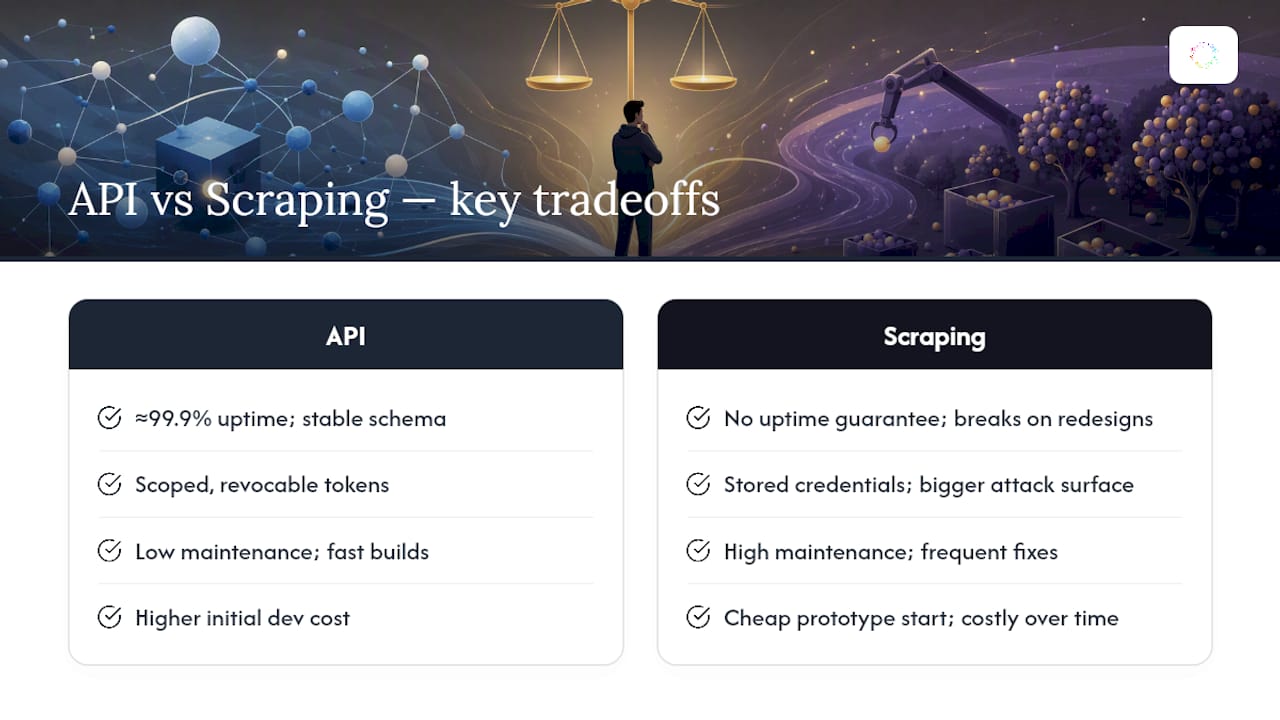
Security is where the two diverge most sharply. Screen scraping that requires login often means storing a real username and password somewhere in your stack, which becomes an attack surface the moment that store is compromised. APIs replace that with scoped, revocable tokens. If a token leaks, you kill it. If a stored password leaks, you’re rotating credentials across every system that touched it.
Maintenance tells the same story from a different angle. Nordic APIs’ 2026 reliability data classifies official APIs as fast to build and low maintenance, while headless browser scraping lands in the medium time-to-first-data, high maintenance category. Selectors break. Rendering timing shifts. Someone has to keep fixing it.
Reliability depends on the specific service, implementation, and operating conditions. Check documented service commitments and measure failures in your own integration; a benchmark from one provider is not a guarantee for APIs as a category.
Cost cuts the other way at the start. Scraping can get you a working prototype in an afternoon when no API exists yet. But that early speed advantage erodes fast once you’re paying an engineer to babysit selectors every sprint. Data completeness sometimes favors scraping, since it can capture fields that only exist in the UI and never made it into any API response, but that completeness comes bundled with fragility.
Choosing Between Screen Scraping and an API in Four Steps
Most engineers can settle this in one sitting. Run through it in order and stop as soon as one step gives you a clear answer.
-
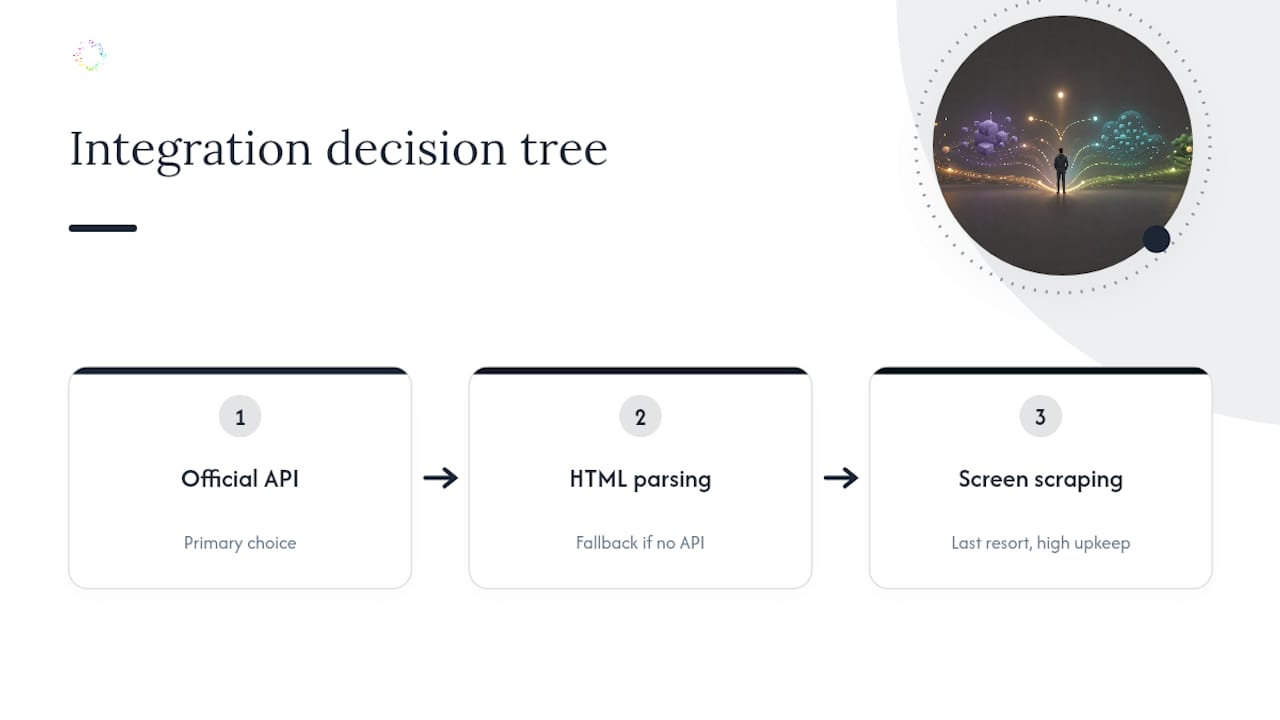
Check for an official API first. If a documented endpoint exists and covers the fields you need, use it. This closes the decision immediately in most cases.
-
If there’s no API, inspect the page. Open dev tools and check the network tab for underlying JSON calls or clean HTML you can parse directly. Plain HTML scraping is more stable than rendering the full UI, so prefer it over full screen scraping whenever the data lives in the source.
-
If the data only appears after rendering, consider screen scraping. This covers dynamic single-page apps, PDFs that need OCR, and legacy terminals with no export path. Budget for ongoing maintenance and monitoring before you commit, since this path carries the highest upkeep of the three.
-
Weigh volume against your SLA. High-volume, mission-critical pipelines justify negotiating direct API access or a licensed data vendor. Low-volume, one-off jobs can tolerate scraping’s rougher edges.
Pro Tip: Build canary tests that hit your scraper’s target page on a schedule and alert you the moment a selector returns nothing. It’s the cheapest early-warning system you’ll ever set up, and it catches breakage hours before your actual pipeline does.
Whichever path you land on, add retries with backoff, cache aggressively to cut request volume, and encrypt any stored credentials at rest, never in plain text.
Security, Compliance, and the Legal Line Around Scraping
Credential handling is the real fault line here. Storing a user’s password to log in and scrape their account creates a persistent attack surface: anyone who breaches that store gets standing access, not a time-limited window. Tokenized OAuth flows flip that risk. A scoped token can be revoked in seconds without touching the underlying password at all, and a mobile-specific breakdown of credential exposure on mobile endpoints makes clear how much wider that attack surface gets once mobile sessions enter the picture.
Regulators are pushing the same direction. The Consumer Financial Protection Bureau’s open-banking rulemaking and industry work through FDX both favor standardized, secure electronic data transfer over credential-based scraping in finance specifically. Is screen scraping legal? Generally yes, in the sense that no blanket law bans it, but the legal exposure shifts case by case with a site’s terms of service and how the data is used, so treat it as a compliance question, not a settled fact.
If you’re stuck scraping, mitigate deliberately:
-
Encrypt stored credentials and rotate sessions on a schedule
-
Monitor continuously for blocks, CAPTCHAs, and silent failures
-
Respect robots.txt and published terms of service where they apply
Investigate the Workflow Before Choosing an Automation Method
When a necessary step is available only through a user interface, first determine how often it occurs, which exceptions require judgment, and whether an authorized API or export covers part of the work. Observing the workflow helps frame that decision; it does not eliminate integration maintenance.
Orchard helps teams investigate employee activity, software usage, and workflow bottlenecks. Isaac supports questions grounded in available activity and evidence, and Studio provides custom dashboards and views. Confirm the scope and suitability of any proposed automation during evaluation, and review Orchard's Trust page for published data-handling information.
The Bottom Line on APIs and Screen Scraping
Three things settle most arguments on this topic. Reach for an API first, every time one exists and covers your fields. Fall back to plain HTML scraping over full screen scraping when no API is available, since parsing source is always more stable than rendering a full browser session. Reserve screen scraping itself for the cases where nothing else works: UI-only data, legacy terminals, or a genuinely temporary extraction job.
Before implementation, check for an authorized endpoint, test one data path, and plan monitoring and maintenance. If you need to understand which repeated work is worth changing, request an Orchard briefing. Confirm the supported approach for your systems rather than assuming a particular scraper or connector is included.
What the Industry Gets Wrong About This Trade-off
Most write-ups on API versus screen scraping treat it as a binary, pick one and move on, when the real decision tree has three branches, not two. Official API first, plain HTML parsing second, full screen scraping only as the last resort. Skipping straight to headless browser automation because “the API doesn’t have everything” is usually a sign nobody checked the network tab for an undocumented JSON endpoint hiding in plain sight.
The bigger blind spot is treating maintenance cost as an afterthought instead of the deciding variable. A scraper that takes an afternoon to build and then eats two hours of engineering time every month for a year has quietly cost far more than the “harder” API integration everyone avoided at the start. Reliability figures like Stripe’s 99.9% benchmark get cited constantly, but the number that should worry you more is the maintenance classification: scraping sits in the high-upkeep tier for a reason, and that reason compounds every quarter you leave it running.
If there’s one priority worth acting on immediately, it’s this: audit your current scrapers for anything that could be replaced by a documented endpoint you never checked for. That single pass usually finds more savings than any new tool you’re considering.
— Katie
Sources
-
Screen Scraping vs API (2026): When to Use Which | ProxiesAPI Guides
-
CFPB 1033 NPRM notice | Consumer Financial Protection Bureau