

RPA earns its keep for a small business in one specific situation: you’re stuck with a legacy system, a vendor portal, or a desktop application that has no API and no clean way to export data. If your tools already talk to each other through integrations, or your data lives in structured spreadsheets, workflow automation or AI extraction will usually get you there faster and cheaper. The rest of this guide walks through how to tell which camp you’re in, what it costs, and how to run a pilot without wasting money.
TL;DR:
RPA is mainly justified for small businesses when no API or structured export exists in legacy systems or vendor portals.
Tasks suitable for RPA include manual data entry from portals, report pulls, and cross-system reconciliations that lack native integration options.
Costs involve a few thousand dollars for initial bot development, plus ongoing maintenance, with Power Automate Desktop offering a low-cost option for Windows-heavy stacks.
Running a pilot should focus on a single process, with clear success metrics and monitoring, before scaling to avoid unmanageable support burdens.
Most small businesses benefit more from native integrations and workflow automation, reserving RPA for specific, hard-to-reach legacy system gaps.
Table of Contents
What RPA Actually Means for a Small Business
Robotic process automation is software that mimics what a person does on a screen. It clicks buttons, copies fields, logs into portals, and moves data between systems, the same way an employee would, just faster and without getting bored on the 400th invoice. That’s the whole idea: a bot wearing a human’s hands.
It’s easy to lump RPA in with other automation types, but the distinction matters for your wallet. Workflow automation connects systems through APIs and webhooks, so when something happens in one app, another app reacts instantly, with no screen involved. AI extraction reads unstructured documents (PDFs, scanned forms, emails) and turns them into structured data your other tools can use.
-
RPA: interacts with the user interface, useful when no API exists
-
Workflow automation: connects apps directly through APIs, faster and more stable
-
AI extraction: pulls structured data out of messy documents like invoices or intake forms
Heading into 2026, the practical advice from most automation consultants has shifted: treat RPA as the fallback option, not the default. Practitioner guidance from Osher Digital argues small businesses should exhaust native integrations and workflow tools first, and reserve RPA for the narrow slice of tasks where a system genuinely has no other way in.
How RPA Benefits Small Businesses That Need It
When RPA is the right fit, the payoff shows up in three places: time, accuracy, and predictability. A repetitive task that takes a person 45 minutes a day, five days a week, is nearly four hours of labor weekly that a bot can absorb without complaint, without a lunch break, and without a typo.
Small teams feel this acutely because there’s no dedicated data-entry department to absorb the grind. The same person who’s supposed to be following up with customers is instead logging into a supplier portal every Tuesday morning to pull a report. That’s the kind of task RPA was built for.
-
Time recovered: routine portal downloads, data re-entry, and cross-system copying often run 3 to 10 hours per month per process
-
Fewer errors: bots don’t fat-finger a decimal point or skip a row when they’re tired
-
Audit trails: every action a bot takes gets logged, which matters when a client or regulator asks “who touched this record?”
-
Freed capacity: staff who aren’t buried in copy-paste work can handle client calls, sales follow-up, or the parts of the job that actually require judgment
Market signal: The worldwide RPA software market has kept growing year over year, which tells you the vendor ecosystem is maturing rather than shrinking. That’s good news for a small business, since more competition among tools tends to push pricing down and support quality up.
None of this means RPA is the only way to get these gains. A workflow tool paired with a native integration often delivers the same time savings without touching a fragile UI. But for the specific case of a legacy system with no API, RPA is often the only automation lever that works at all.
RPA vs Workflow Automation vs AI Extraction: How to Choose
Before you commit to any automation tool, run your task through four quick questions. The answers point you toward the cheapest option that will actually hold up.
-
Does the target system expose an API? If yes, skip RPA and use a native integration or a workflow tool like Power Automate or Zapier.
-
Is the data structured? Clean spreadsheet rows and database fields favor workflow automation. Scanned PDFs, handwritten forms, or inconsistent invoice layouts favor AI extraction.
-
How often does the task run, and how repeatable is it? A monthly task with five clear steps is a good automation candidate. A task that changes shape every time someone runs it usually isn’t worth automating yet.
-
What’s the exception rate? If a process throws a curveball more than 20% of the time (missing fields, unexpected pop-ups, login failures), automating it will cost more in maintenance than it saves in labor.
The decision ladder that most consultants recommend runs in this order: native integration first, workflow automation second, AI extraction third, and RPA only when the first three options fail because the system has no API and no structured export path. Osher Digital’s analysis backs this up directly: when APIs or structured exports exist, workflow automation with an AI extraction step will almost always be cheaper and faster to build than a UI-driven bot.
The trade-offs are concrete, not theoretical. Native integrations and workflow tools tend to be quicker to set up and cheaper to maintain, because they’re not dependent on a screen layout that might change without warning. RPA bots, by contrast, break when a vendor redesigns their login page or moves a button three pixels to the left. That’s not a hypothetical risk. It’s the single biggest maintenance cost small businesses underestimate when they first buy an RPA tool.
Pro Tip: Before you build anything, time yourself doing the task manually for two weeks and write down every time something unexpected happened. That log becomes your business case and your maintenance budget in one document.
Where RPA Actually Pays Off: Real Use Cases
The tasks that make sense for RPA share a pattern: they’re repetitive, rule-based, and stuck inside a system that won’t cooperate any other way.
-
Accounts payable entry: downloading invoices from a supplier portal that has no export feature, then keying line items into accounting software
-
Scheduled report pulls: logging into a government or industry portal every week to grab a compliance report that only exists as an on-screen table
-
Form and PDF intake: moving customer applications or intake forms into a CRM when the source system won’t let you connect directly
-
Cross-system reconciliation: comparing numbers between a legacy point-of-sale system and a modern accounting platform when neither talks to the other
A bookkeeping-heavy small business is a good example of where this gets tested in practice. If your accounts payable process involves logging into three different supplier portals every week, a single bot handling just that reconciliation step can be worth building even if nothing else in your stack touches RPA. For businesses further down that path, resources on how to automate bookkeeping tasks cover the workflow-automation side of the same problem, which is often the cheaper first move before RPA enters the picture.
The common thread across every one of these examples: something is manually bridging two systems because nobody built a proper connection between them, and building that connection isn’t an option.
What RPA Actually Costs a Small Business
Pricing for RPA gets murky fast because vendors quote wildly different numbers depending on whether you’re licensing per machine, per user, or per hosted environment. Here’s the shape of it in plain terms.
-
One-off build cost: a single targeted bot, scoped narrowly, often runs a few thousand dollars to design, build, and test
-
Monthly maintenance: expect ongoing costs tied to monitoring and fixing broken bots when a target system changes its layout
-
Licensing shapes: per-machine licenses suit a bot running unattended on one dedicated PC; per-user licenses suit teams triggering bots themselves; hosted/cloud licenses add convenience but usually cost more monthly
-
Hidden costs: password rotations breaking login steps, software updates shifting button positions, and the internal time spent babysitting a bot nobody fully understands
Cost signal: Forge RPA’s guidance for small and growing businesses notes that single-target bot builds tend to run substantially cheaper than full enterprise RPA programs, and recommends starting with a fixed-price discovery phase before committing to a build. That’s a meaningfully different cost structure than the six-figure RPA rollouts built for large enterprises.
If you’re on a Windows-heavy stack already, Power Automate Desktop is worth checking before you shop elsewhere. It’s often included free for attended automation with a Microsoft 365 Business subscription, which changes the payback math considerably for a small team.
Payback usually becomes clear within a few months if the task you’re automating eats more than 3 to 5 hours a week. Below that threshold, the maintenance overhead can eat the savings, and a workflow tool is probably the smarter spend.
How to Run a Low-Risk RPA Pilot
Skip the temptation to automate five processes at once. Pick one, prove it works, then expand.
-
Map the process end to end, including every click, login, and decision point, not just the happy path.
-
Measure frequency and exception rate over two to four weeks before writing a single line of automation logic.
-
Identify an owner who’s responsible for the bot once it’s live, plus a rollback plan for when (not if) it breaks.
-
Scope the pilot to one bot with a clear definition of success: hours saved per week and error rate compared to manual entry. Agree the timeline after reviewing access requirements, exceptions, testing, and the approval process.
-
Set a budget ceiling before you start, and treat any quote wildly above that ceiling as a signal to reconsider scope.
-
Put monitoring in place from day one, so you know within hours when a bot fails instead of discovering it a week later when invoices pile up.
-
Document version control, meaning you know exactly what changed and when, so fixing a broken bot doesn’t mean starting from scratch.
This mirrors the path most automation consultancies recommend: a scoped, fixed-price discovery phase followed by a single pilot build, rather than jumping straight into a multi-process rollout.
Pro Tip: Set your success metric before you build anything, not after. “Save 4 hours a week on invoice entry” is measurable. “Make this more efficient” is not, and you’ll never be able to prove the pilot worked.
How Orchard Approaches Small-Business Automation Differently
Orchard helps teams investigate employee activity, software usage, and repeated work before choosing what to improve. Isaac supports questions about the activity and evidence available to Orchard, while Studio provides custom views of that information.
-
Review the activity and exceptions available for each automation candidate before deciding what to improve.
-
Define the scope, decide what should run, and identify where a person should review the outcome.
-
Completed runs and recorded manual-work baselines support estimates of time saved and labor value. These estimates are not proof of reduced spending.
-
Account for implementation and operating costs separately when assessing the value of a change.
For businesses weighing governance questions before rolling out any automation tool, Orchard’s security and data-handling practices are worth a look alongside whatever platform you’re evaluating.
The Bottom Line on RPA for Small Business
Evaluate native integrations and workflow tools before committing to RPA. When a legacy interface leaves no suitable alternative, begin with a scoped pilot. Set review points around completed discovery, a tested pilot, and an agreed measurement period; expand only when the evidence supports the next step.
Keeping RPA Running Without It Becoming a Second Job
The mistake most small businesses make with RPA isn’t the initial build. It’s assuming a bot runs itself forever once it’s live. Vendor portals redesign their login pages. Accounting software pushes an update that moves a field. Every one of these breaks a bot that was working fine yesterday.
The fix isn’t complicated, but it does require discipline. Assign one person, even part time, as the bot’s owner, someone who gets an alert the moment something fails rather than finding out three days later when invoices are backed up. Keep a simple changelog of what each bot does and why, so if that person leaves, whoever replaces them isn’t reverse-engineering a black box.
Scaling from one bot to several works best when you resist the urge to automate everything at once. Add a second process only after the first one has run cleanly for a month with minimal intervention. That gives you a real maintenance baseline instead of a guess, and it keeps your support burden from growing faster than your team’s capacity to manage it.
Review your automated processes on a set schedule, quarterly is reasonable for most small teams, and ask a blunt question each time: is this bot still saving more time than it costs to maintain? Some tasks that made sense at launch stop making sense once a vendor finally ships an API. When that happens, retire the bot and switch to the integration. There’s no prize for keeping a workaround alive after the real fix arrives.
Fitting RPA Into Systems You Already Use
RPA doesn’t replace your accounting software, your CRM, or your point-of-sale system. It sits on top of them, operating the interface the way a person would, which means integration planning looks different than it does for API-based tools.
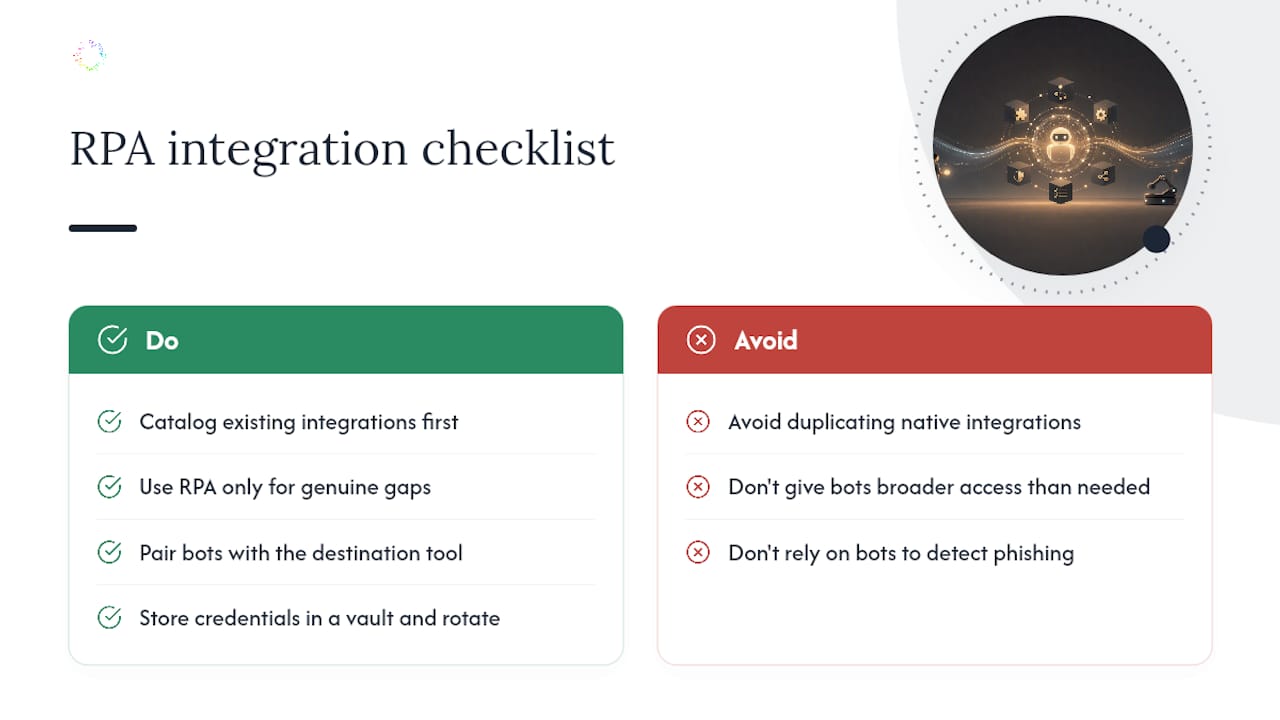
Start by cataloging what already talks to what. If your CRM and your invoicing software already sync through a native integration, don’t build a bot to duplicate that connection. Save RPA for the genuine gaps, the supplier portal that only offers a “download as PDF” button, the government filing site that requires manual login every time, the legacy inventory system your industry still runs on because switching would cost more than the automation itself.
Sequencing matters too. A bot that pulls data from a portal usually needs somewhere to put it, so pair it with whatever tool already manages that destination, whether that’s a spreadsheet, a database, or your accounting platform’s import feature. Comparative breakdowns like this guide to consulting workflow automation are useful reading if you’re trying to map which parts of your stack are candidates for direct integration versus which genuinely need a bot standing in for a human.
One practical note on security: any bot that logs into a portal needs credentials, and those credentials need the same protection as a human employee’s login, ideally more, since a bot can’t notice a phishing attempt or a suspicious redirect the way a person might. Store credentials in a proper vault, rotate them on a schedule, and limit each bot’s access to exactly what it needs, nothing broader.
Why Most Small Businesses Skip the Enterprise RPA Trap
The businesses that waste money on RPA usually make the same mistake: they buy the enterprise platform before they’ve proven a single process is worth automating. That’s over-architecting a solution before you understand the problem.
The better path starts with data, not assumptions. Watching how a task actually gets done, including every workaround and exception nobody wrote down, tells you more about what’s worth automating than any workshop ever will. That’s the reasoning behind capturing real workflow behavior before committing to a build.
If you’re trying to figure out whether your business has an RPA problem or a workflow-automation problem, that discovery step is the one to invest in first.
— Katie
Where Orchard Fits Once You’ve Found the Right Task
Start by identifying a repeated task and the evidence needed to evaluate it. Record its volume, manual effort, exceptions, and the outcome a successful change should achieve.
Check which systems and activity are available before drawing conclusions. Confirm supported systems and any evaluation arrangements during a briefing.
Request an Orchard briefing to discuss your workflow, the scope of a possible evaluation, and how to assess the findings.