

RPA automates deterministic, rule-driven tasks by mimicking clicks and keystrokes on stable software. Intelligent automation (IA) adds AI, letting a system read a messy invoice, interpret a customer email, or decide which exception path to take. Use RPA for structured, unchanging processes, IA when judgment or unstructured data is involved, and a hybrid when your workflow needs both speed and comprehension.
TL;DR:
RPA and AI can be combined in one workflow. Choose the approach for each step based on input quality, decision requirements, and acceptable risk.
RPA handles highly structured inputs and repetitive tasks with quick deployment, while IA manages unstructured data and tasks requiring interpretation, which need longer setup times.
Hybrid workflows for tasks like claims processing maximize ROI, with AI interpreting data and RPA executing subsequent steps within a unified process.
Cost differences include predictable upfront licensing for RPA versus ongoing model maintenance and data labeling costs for IA, affecting three-year total ownership.
Governance concerns for IA, especially with generative models, require layered controls, human oversight, and monitoring to mitigate hallucinations and model drift risks.
Table of Contents
-
Intelligent Automation vs RPA: What Each Term Actually Means
-
RPA vs Intelligent Automation: Core Differences That Actually Matter to Buyers
-
What Implementation Actually Costs in Time, Money, and Maintenance
-
The Governance Gap: Auditability, Hallucinations, and Monitoring Risk
Intelligent Automation vs RPA: What Each Term Actually Means
RPA repeats defined steps across an interface or API. Stable rules can make results predictable, but accuracy still depends on the implementation, input quality, application state, and exception handling. Validate outcomes with representative data before scaling.
Intelligent automation starts with that same bot foundation, then bolts on AI components, most commonly machine learning, natural language processing, and computer vision, so the system can handle inputs that vary in shape and content. Instead of a rigid rule (“if field A equals X, do Y”), an IA system makes a probabilistic call: “this looks like a refund request, 92% confidence, route to the refunds queue.” That single shift, from deterministic to probabilistic, explains nearly every practical difference between the two approaches.
A few adjacent terms tend to get thrown around interchangeably, and it’s worth knowing they aren’t quite synonyms:
-
Cognitive automation usually refers specifically to the AI layer that interprets unstructured content (documents, images, speech).
-
Intelligent process automation (IPA) is often used as a near-synonym for IA, sometimes with more emphasis on end-to-end process redesign.
-
Hyperautomation is Gartner’s umbrella term for combining RPA, AI, process mining, and orchestration tools at an enterprise scale.
None of these labels change the underlying question you’re actually answering: does this task need fixed rules, or does it need interpretation?
RPA vs Intelligent Automation: Core Differences That Actually Matter to Buyers
The marketing language around both categories tends to blur together, so it helps to compare them on dimensions that show up in a procurement decision rather than a vendor pitch deck.
-
Input type. RPA needs structured data in a predictable format (a fixed-layout form, a database field). IA can work with unstructured input: scanned PDFs, free-text emails, spoken language, images.
-
Decision logic. RPA follows hard-coded rules. IA applies trained models that weigh probability and can improve as they see more examples.
-
Auditability. RPA’s every action is fully traceable, since it follows the same coded path every run. IA’s decisions are harder to fully reconstruct after the fact, because a model’s confidence score doesn’t come with an explicit rule trail.
-
Deployment speed. RPA bots for a well-documented process can often go live in weeks. IA projects usually need data collection, model training, and validation cycles first.
-
Maintenance burden. RPA breaks the moment a screen layout or field name changes. IA is more resilient to minor input variation but needs ongoing model monitoring to catch drift.
That maintenance point cuts both ways more than most vendors admit. RPA is brittle to structural change but simple to fix; IA is more flexible day to day but harder to diagnose when it quietly starts making worse calls.
A hybrid design can use AI to interpret variable inputs and deterministic automation to execute validated steps. Evaluate that combination against your own workflow rather than assuming one approach fits every stage.
The practical planning question is which parts of the process need which capability, and how to validate the handoff between them.
Where RPA, IA, and Hybrid Workflows Actually Get Used
Abstract definitions only get you so far. Here’s how the split plays out on real workflows.
-
Pure RPA: invoice posting and reconciliation. A finance team receiving invoices in one fixed template can have a bot extract fields and post them to the general ledger with zero human review, because the input never changes shape.
-
Pure RPA: scheduled data reconciliation. Nightly bots that compare two system exports and flag mismatches are a textbook RPA case: stable rules, structured inputs, no judgment calls.
-
Pure IA: document understanding. A mortgage processor receiving pay stubs, bank statements, and IDs in a dozen different formats needs OCR and NLP to extract meaning from documents that were never designed to be machine-readable.
-
Pure IA: customer service triage. Classifying an incoming support ticket by sentiment and topic, then routing it, requires interpreting free text, not matching a fixed field.
-
Hybrid: claims processing. AI reads the claim form and supporting documents, extracts the relevant fields, and flags anomalies. RPA then takes those clean, structured outputs and executes the downstream steps: updating the claims system, triggering payment, closing the ticket. Enterprises get the best ROI when AI handles interpretation and RPA handles execution inside one orchestrated flow, rather than treating them as separate systems.
The hybrid pattern in scenario five is worth internalizing on its own, because it’s the architecture most mature automation programs converge on eventually.
How to Choose Between RPA, IA, and a Hybrid Approach
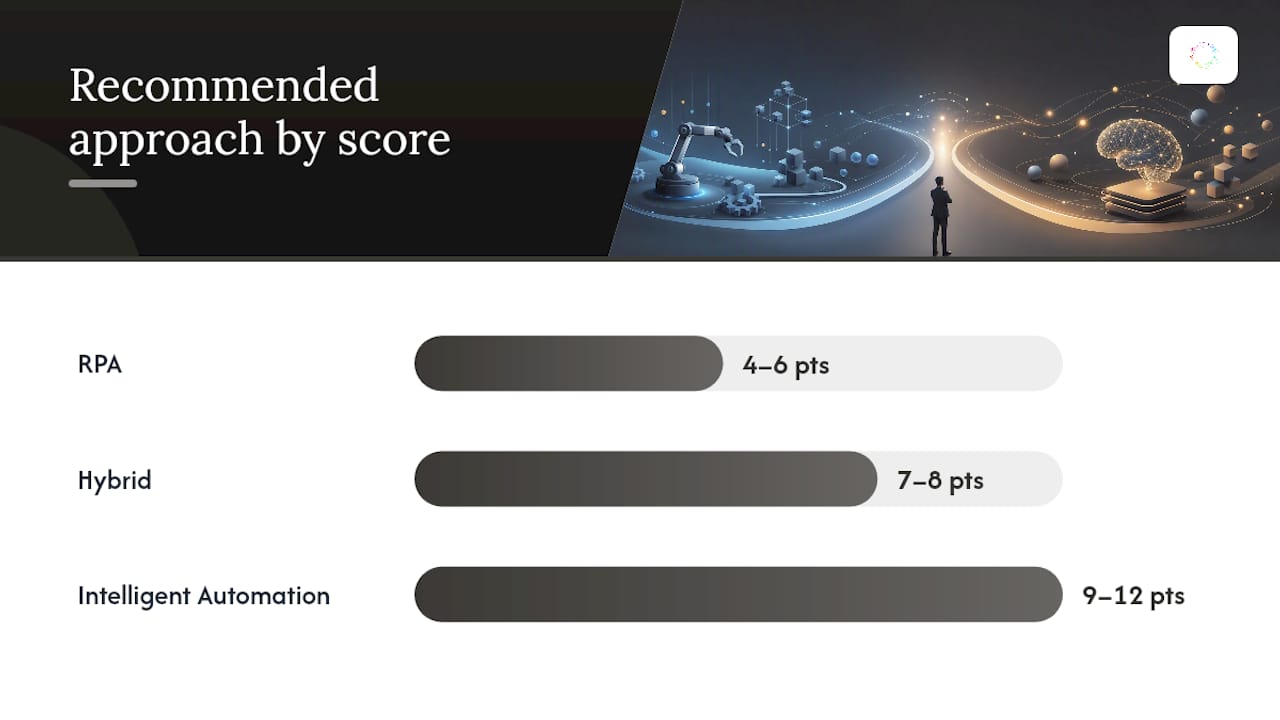
Rather than guessing, score each candidate process on four questions. Rate each 1 (low) to 3 (high):
-
How structured is the input? A fixed form scores 1; free text or images score 3.
-
How much judgment does a human currently apply? A pure lookup scores 1; nuanced case-by-case decisions score 3.
-
How often does the process throw an exception? Under 5% exception rate scores 1; above 20% scores 3.
-
How often does the process itself change? Stable for a year or more scores 1; monthly changes score 3.
Use this score as an illustrative discussion aid, not a validated selection model. Lower scores suggest investigating RPA first; higher scores suggest investigating AI-assisted or hybrid designs. Validate the choice against sample inputs, exception handling, cost, and governance requirements.
Before you commit budget to a pilot, run it against a short checklist:
-
Define success as a measurable number: hours saved, error rate reduction, or cost per transaction, not “improved efficiency.”
-
Confirm you have enough historical data to train or validate an AI component, if one is involved.
-
Scope the pilot to a single, well-bounded process rather than an entire department’s workflow.
-
Set a governance checkpoint before production: who signs off, and what accuracy threshold triggers a pause.
Pro Tip: Run the RPA-only version of a process first, even if you eventually plan to add AI. It forces you to document the exact steps and exceptions, which becomes the training data and the audit baseline for the intelligent layer later.
If a process fails the checklist, that’s a signal to redesign scope, not to push forward and hope the model figures it out. A structured AI readiness workshop can help teams pressure-test scope before committing engineering time.
What Implementation Actually Costs in Time, Money, and Maintenance
RPA projects for well-documented processes commonly reach production in a matter of weeks. IA projects take longer, because data preparation, model training, and governance reviews add real calendar time before anything touches production traffic.
Cost follows the same curve. RPA licensing and bot development are relatively predictable and front-loaded. IA adds ongoing costs: data labeling, model retraining, and monitoring infrastructure that doesn’t show up in a simple bot-per-seat calculation. When comparing three-year total cost of ownership, weigh these factors:
-
Licensing and infrastructure for the automation platform itself.
-
Development and configuration time, which scales with process complexity.
-
Ongoing maintenance, higher for RPA when source systems change frequently, higher for IA when models need retraining.
-
Integration work with existing systems of record, ERPs, CRMs, and document repositories.
Hybrid orchestration, where AI and RPA components sit in a single managed workflow rather than as bolted-together point solutions, tends to reduce integration risk because there’s one place to monitor failures instead of two disconnected systems quietly drifting apart. A manager’s guide to workflow automation vendors is a useful reference when comparing platforms on exactly these integration and staffing questions. Staffing needs shift accordingly: RPA maintenance is often handled by a citizen developer or business analyst, while IA maintenance usually needs someone who understands model performance, not just bot logic.
The Governance Gap: Auditability, Hallucinations, and Monitoring Risk
RPA’s audit trail is simple because its logic is simple: every action maps to an explicit rule, so reconstructing “why did the bot do that” takes minutes. IA introduces a governance gap, because a model’s decision comes from weighted probabilities across training data, not a line of code you can point to.
That gap gets worse with generative and agentic components, where a system doesn’t just classify, it generates text or takes multi-step action on its own. Hallucinated outputs and non-deterministic behavior are real operational risks, not theoretical ones.
Mitigate them with layered controls:
-
Keep a human in the loop for any decision above a defined risk or dollar threshold.
-
Add a validation layer that checks AI outputs against business rules before they trigger downstream RPA actions.
-
Monitor for model drift, since accuracy on day one doesn’t guarantee accuracy six months later as real-world inputs shift.
-
Log every AI decision alongside its confidence score, not just the final action taken.
The scale of the risk is bigger than most teams assume. Gartner projects that more than 40% of agentic AI projects will be cancelled by the end of 2027, largely due to scoping and governance failures rather than the technology failing outright. A compliance-focused guide to agent discovery is worth reading before greenlighting anything agentic in a regulated workflow.
What 2026 Signals Mean for Agentic AI Adoption
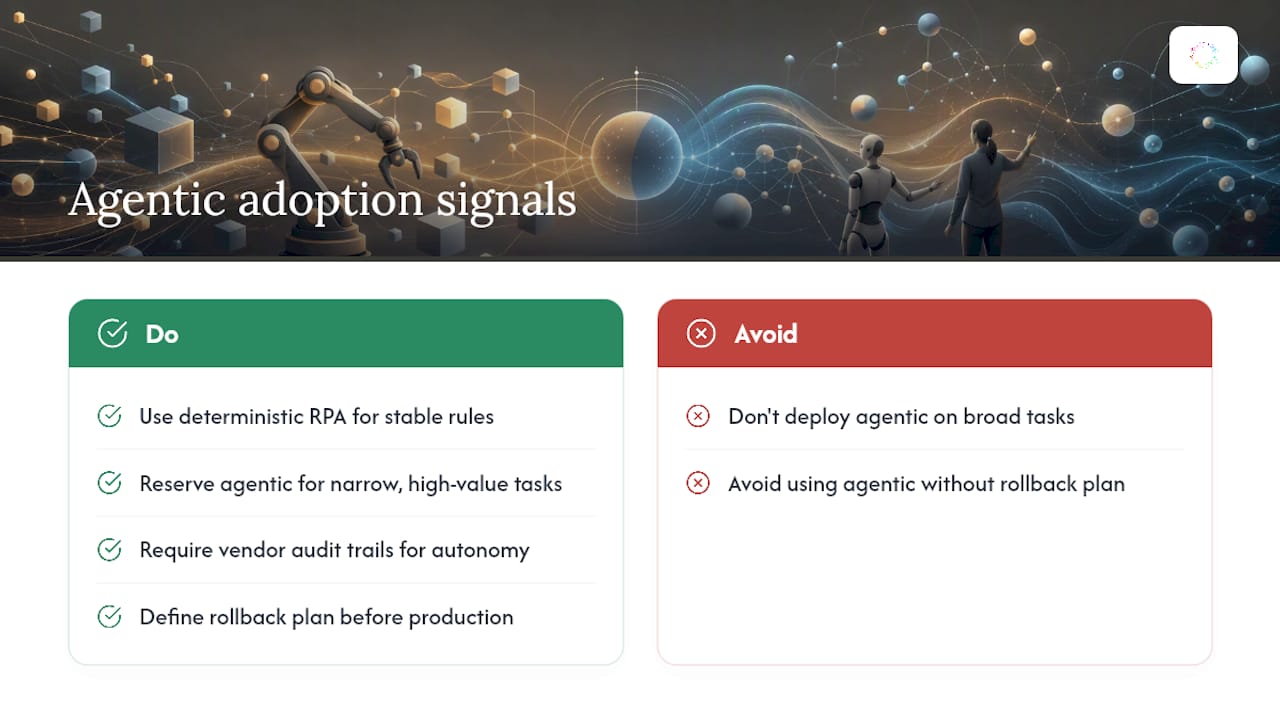
Agentic AI promises systems that plan and execute multi-step work with minimal supervision. That’s genuinely useful, but Gartner’s cancellation forecast is a warning about scoping discipline, not a reason to avoid the category entirely.
The practical rule holds regardless of how good the models get: prefer deterministic RPA first for anything stable and rule-based, and reserve agentic approaches for narrow, well-scoped, high-value tasks where the upside justifies the added governance overhead. Watch for two signals before scaling an agentic pilot: whether the vendor can show a clear audit trail for every autonomous decision, and whether your own team has defined a rollback plan before the agent touches production data.
Orchard in Practice: Investigate Work Before Automating
Before choosing an automation approach, examine where effort repeats and where work slows down. Orchard provides employee activity and workforce analytics across the supported systems and scope your organization makes available.
-
Use Isaac to investigate repeated work and the evidence behind a finding.
-
Compare activity across supported applications and teams before choosing an automation approach.
-
Track completed automations with estimated time saved and labor-capacity value; verify actual spending changes separately.
Use those findings alongside process-owner interviews, testing, and risk review when deciding whether a workflow needs RPA, AI, or both.
Pilot Small, Measure Everything, Then Scale
The organizations that get automation right treat it as augmentation, not replacement, and analysts back that framing: intelligent automation works best when it hands people better tools rather than eliminating their judgment. Start with one process, define your success metric before day one, and govern the pilot as tightly as you’d govern the eventual production system.
If you’re weighing RPA against intelligent automation for your own backlog, running the scoring framework above against a real workflow beats another vendor demo.
— Katie
See What Orchard Surfaces in Your Own Workflows
Orchard can help teams investigate software usage, repeated work, and workflow bottlenecks before committing to an automation build. Findings reflect the activity and scope made available, so confirm exceptions with the people doing the work.

Isaac supports investigation, and Studio provides custom views of the findings. Your team chooses which supported workflows to automate and where review is required. Completed runs and manual baselines support estimates of time saved and labor value; those estimates are not proof of reduced spending.
Request an Orchard briefing about your candidate workflow, supported systems, review requirements, and evaluation scope.