

Desktop process discovery examines activity from approved work systems to help teams understand how tasks are performed. It can reveal repeated steps, app switching, and workarounds missing from process documentation. Validate findings with the people doing the work before selecting an automation candidate; coverage and timing depend on the capture method, scope, and task frequency.
TL;DR:
Desktop process discovery is most valuable when workflows span multiple applications, legacy systems lack logs, or processes involve frequent exceptions and app-switching.
Effective programs focus on a few valuable tasks, representative observations, validation by subject matter experts, and a scoped test before broader deployment.
Privacy and security controls, such as local data processing, masking, and explicit user consent, are essential to build trust and ensure compliance during implementation.
Platforms that rely on semantic induction and editable Playbooks enable business users to review and modify automation candidates easily, increasing adoption and accuracy.
Treat discovery as a continuous process, integrating findings into existing automation pipelines and regularly rerunning to prevent drift and outdated automations.
Table of Contents
-
What Is Desktop Process Discovery, and How Does It Differ From Process Mining?
-
Why Desktop-Focused Discovery Matters for Enterprise Automation
-
Core Methods: Capture, Analysis, and What Comes Out the Other End
-
Turning Discovery Findings Into a Broader Automation Program
-
Orchard's Approach: Investigating Work with Activity and Evidence
What Is Desktop Process Discovery, and How Does It Differ From Process Mining?
Desktop process discovery captures what happens on a screen, not just what shows up in a system log. It records mouse clicks, keystrokes, window switches, and application activity, then uses AI to group that raw activity into recognizable tasks. This is sometimes called observation-first discovery, because the software watches real work rather than relying on a diagram someone drew six months ago.
Process mining, by contrast, reconstructs workflows from event logs already sitting inside ERP, CRM, or ticketing systems. It’s powerful when a process lives entirely inside one well-instrumented application. Task mining sits closer to desktop discovery but usually focuses on narrower, single-application activity rather than the full cross-app sequence a person actually follows.
The gap between these methods matters most in a few recurring situations:
-
Legacy systems with no usable API or event log to mine.
-
Attended processes where a human makes judgment calls between system steps.
-
Heavy app-switching work, like an analyst bouncing between a spreadsheet, an email client, and an internal portal.
-
Exception-rich workflows where the “happy path” only describes a fraction of real cases.
If a process lives entirely in one modern system with clean logs, process mining alone may answer most questions. If it spans five applications and two decades-old tools nobody documented, desktop-level observation is what fills in the picture.
Why Desktop-Focused Discovery Matters for Enterprise Automation
Desktop discovery finds the work that never shows up in an org chart or a documented SOP. Analysts spend hours moving data between a legacy mainframe screen and a modern reporting tool. HR staff paste the same fields into three separate systems during onboarding. Support agents look up the same account history in two places before answering a routine question. None of that appears in a process diagram, because nobody thought to write it down. It only shows up when software watches the actual sequence of clicks and app switches.
A narrowly scoped pilot can surface repetitive sequences for review. The number of useful candidates depends on the roles observed, available activity, process frequency, and validation by subject matter experts.
The patterns repeat across departments. Finance teams reconcile the same three spreadsheets every month using an identical copy-paste sequence. HR onboarding involves re-entering the same new-hire data across payroll, benefits, and directory systems. Support teams manually cross-reference case history before every escalation. Gartner’s analysis of automated business process discovery notes that observation-based methods reduce the risk of automating a process that’s already broken, because the discovery step reveals the real workflow before anyone builds an automation on top of a flawed assumption. That distinction shows up directly in ROI signals: candidate counts, estimated hours reclaimed per role, and how much faster automation moves from idea to pilot.
Core Methods: Capture, Analysis, and What Comes Out the Other End
Desktop discovery platforms combine three layers: how they capture activity, how they analyze it, and what they produce for a team to act on.
Capture techniques vary by vendor and use case. Some tools take periodic screenshots and run them through vision models to detect app switching and repetitive micro-tasks, an approach MindStudio’s guide to AI screen monitoring describes as useful precisely because it reveals context-switching costs invisible to log-based tools. Others rely on event-level capture, logging clicks, keystrokes, and window focus changes directly through an installed agent. Full agent telemetry captures more granular detail but also generates far more raw data to process.
Analysis techniques are where the real differentiation happens. Optical character recognition extracts text from screenshots. Pattern recognition groups repeated action sequences. The more advanced layer is semantic induction: using large language models to convert low-level interactions like clicks and keystrokes into hierarchical, human-readable workflows. A CEUR Workshop paper on semantic induction describes exactly this transformation, turning raw telemetry into workflow structures a business analyst can actually read and validate. Platforms like WorkflowX take this further, connecting captured observation to an intelligence layer that infers intent, proposes a replacement workflow, and measures before-and-after ROI once a team adopts it.
Outputs vary by platform and may include task summaries, process maps, or ranked automation candidates. Verify whether a vendor produces executable automation or requires a separate development step.
The trade-offs are real. More granular capture means more storage and more processing time. Local, on-device processing protects sensitive data but limits the cross-machine pattern detection that cloud aggregation makes easier. Integration overhead grows fast if a platform tries to connect its outputs directly into a dozen downstream automation tools.
Pro Tip: If your environment includes legacy desktop applications, check whether a candidate process touches file handles or shared resources another program is using. A tool like Process Explorer can confirm which processes hold a given file before you automate around it.
How Do You Run a Desktop Process Discovery Program?
A discovery program moves through preparation, capture, analysis, and prioritization. The sequence below is an illustrative planning template; adapt the capture windows and pilot duration to task frequency, privacy review, and representative exception coverage.
-
Define scope and success metrics. Pick two or three job roles, agree on what “success” looks like (hours saved, candidates identified, error reduction), and set privacy guardrails before anyone installs anything.
-
Design the capture window. A workable pilot design runs two to four short capture sessions per role, each two to four hours long, rather than continuous all-day monitoring.
-
Run the capture with masking in place. Apply application blacklists and screen masking up front so sensitive screens never get recorded in the first place.
-
Analyze the captured activity. Use the available analysis methods to identify repeated sequences, then shortlist candidates for expert review without assuming a fixed number of findings.
-
Validate with subject matter experts. Have the people who actually do the work confirm which of the top candidates are real, worth automating, and correctly understood.
-
Pilot a validated candidate. Document its intended behavior and exception handling, test it in a limited scope, and compare results with the baseline before expanding.
| Stage | Illustrative planning duration | Key output |
|---|---|---|
| Prepare (scope, metrics, guardrails) | 2–3 days | Signed-off scope and privacy rules |
| Capture (per role) | 2–4 sessions, 2–4 hours each | Raw activity logs |
| Analyze and validate | 3–5 days | Ranked candidate list, SME sign-off |
| Prioritize and pilot | 1 business week | Pilot results and comparison with baseline |
That cadence lines up with what MindStudio’s practitioner guidance recommends: act on the top two or three findings, then rerun discovery to measure whether the fix actually worked, rather than waiting for a “complete” map of every process in the department.
Privacy, Security, and Governance Best Practices
Discovery only works if employees trust the process, and that trust is built through controls, not promises. Technical safeguards should be non-negotiable from day one: local processing that keeps raw captures on-device, screen masking for sensitive fields, application blacklists that exclude personal or regulated software, encryption at rest, and role-based access control limiting who can view raw sessions.
Operational controls matter just as much. Get explicit consent before capture begins, set a clear retention window for raw data, and require SME review before any screenshot moves into a decision report.
Successful enterprise rollouts layer strong access controls and masking rules at the point of collection, keep raw captures for a short retention window, and require expert validation before any raw screenshot appears in a report anyone outside the discovery team will see.
That combination, drawn from an ICETETAS paper on AI-based desktop workflow analysis, reduces legal exposure while keeping the discovery process fast enough to be useful. Document every governance decision and keep an audit trail. When compliance asks how a specific workflow was captured six months later, “we didn’t write it down” is not an acceptable answer.
Measuring Results: What to Report as ROI
The KPIs that matter are simple: number of validated automation candidates, estimated hours saved per week or month, the percentage of candidates that actually convert into live automations, and any measurable drop in manual errors. Baseline these using the captured sessions themselves, then confirm the estimate with a short pilot before promising a number to leadership.
| Metric | What it shows | How to baseline it |
|---|---|---|
| Automation candidates identified | Scope of opportunity | Count from ranked discovery output |
| Estimated hours saved | Estimated labor capacity value | Time per task × frequency from captures |
| Candidate-to-automation conversion rate | Program follow-through | Track candidates piloted vs. shelved |
| Error reduction | Quality impact | Compare manual error rate pre/post pilot |
For an executive audience, keep the report to four things: a plain-language value summary, the prioritized candidate list, a rollout timeline, and the risks or dependencies that could slow it down.
Where Desktop Process Discovery Runs Into Trouble
The most common failure isn’t technical. It’s scope creep: teams try to observe every role in every department at once and drown in data nobody has time to review. Start narrow. Three roles and a few short sessions each beats a six-month, department-wide capture that generates more noise than insight.
A second challenge is employee resistance. People understandably get nervous about software watching their screen, especially if the purpose and boundaries aren’t communicated clearly upfront. The fix isn’t a memo after the fact. It’s stating, before capture begins, exactly what gets recorded, what gets masked, and how long raw data sticks around.
Data volume is a real technical constraint too. Screen capture and event logging generate enormous amounts of raw material, and processing it into usable workflows takes real compute time, particularly when semantic induction runs over weeks of activity across dozens of users. Platforms that batch process and apply pattern recognition before running the heavier AI analysis tend to handle this better than tools that try to do everything in real time.
There’s also a false-positive problem. Not every repeated action sequence is worth automating. Some patterns look repetitive in the data but involve enough judgment or exception handling that automating them creates more risk than value. This is exactly why SME validation before prioritization matters. Software can find the pattern; a human still has to confirm it’s the right one to fix. Skipping that step is how discovery programs end up automating a broken process faster.
Comparing Desktop Process Discovery Approaches
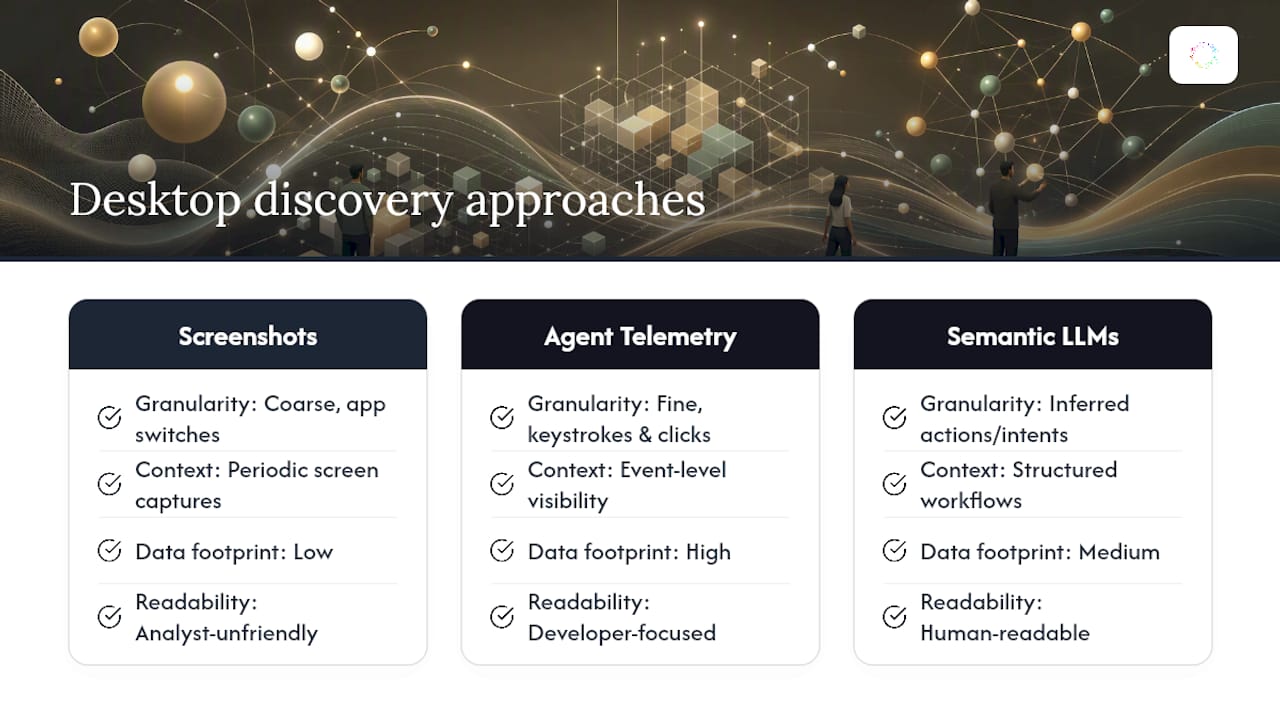
Desktop discovery tools generally split into a few categories rather than one uniform product type. Screenshot-based monitoring tools rely on periodic captures analyzed by vision models, which works well for spotting app-switching patterns but can miss fine-grained keystroke-level detail. Full agent-telemetry platforms capture clicks, keystrokes, and window events directly, trading a heavier data footprint for finer granularity. Some platforms lean almost entirely on semantic induction, using large language models to turn raw interaction data into readable, hierarchical workflows that a business analyst can validate without touching code, an approach documented in projects like the workflow induction toolkit on DeepWiki.
Broader platform categories matter here too. Some vendors bundle desktop discovery with orchestration and case management into a single suite, which the Keystone Consulting guide to workflow management systems frames as a spectrum running from lightweight task trackers to full enterprise orchestration platforms. Enterprise desktop discovery platforms sit closer to the observation-first end of that spectrum: they install directly on Windows machines, learn from real work without requiring a pre-documented process map, and convert findings into editable Playbooks rather than static reports.
When comparing options, weigh three things: whether the platform needs pre-built process documentation to start (many do), whether it handles attended, exception-heavy work or only clean, repetitive sequences, and whether its output is something a business user can review and edit or something only a developer can touch. Platforms requiring upfront documentation defeat the purpose of discovery in the first place, since the whole point is finding what nobody wrote down.
Turning Discovery Findings Into a Broader Automation Program
Discovery output is only valuable if it feeds into something bigger than a single automation. The first mistake teams make is treating discovery as a one-time project instead of a recurring input into a process improvement backlog. Findings should route into the same prioritization process used for any other automation or process improvement request, scored against the same value and effort criteria.
Second, connect desktop-level findings to existing process documentation and RPA pipelines rather than building a parallel, disconnected system. If discovery surfaces a sequence that touches a system already covered by an existing automation, that finding should update the existing Playbook, not spawn a competing one.
Third, treat validated candidates as a living list, not a static report. Rerunning discovery periodically, especially after a system change or reorg, catches drift as workflows evolve and prevents automations from quietly going stale.
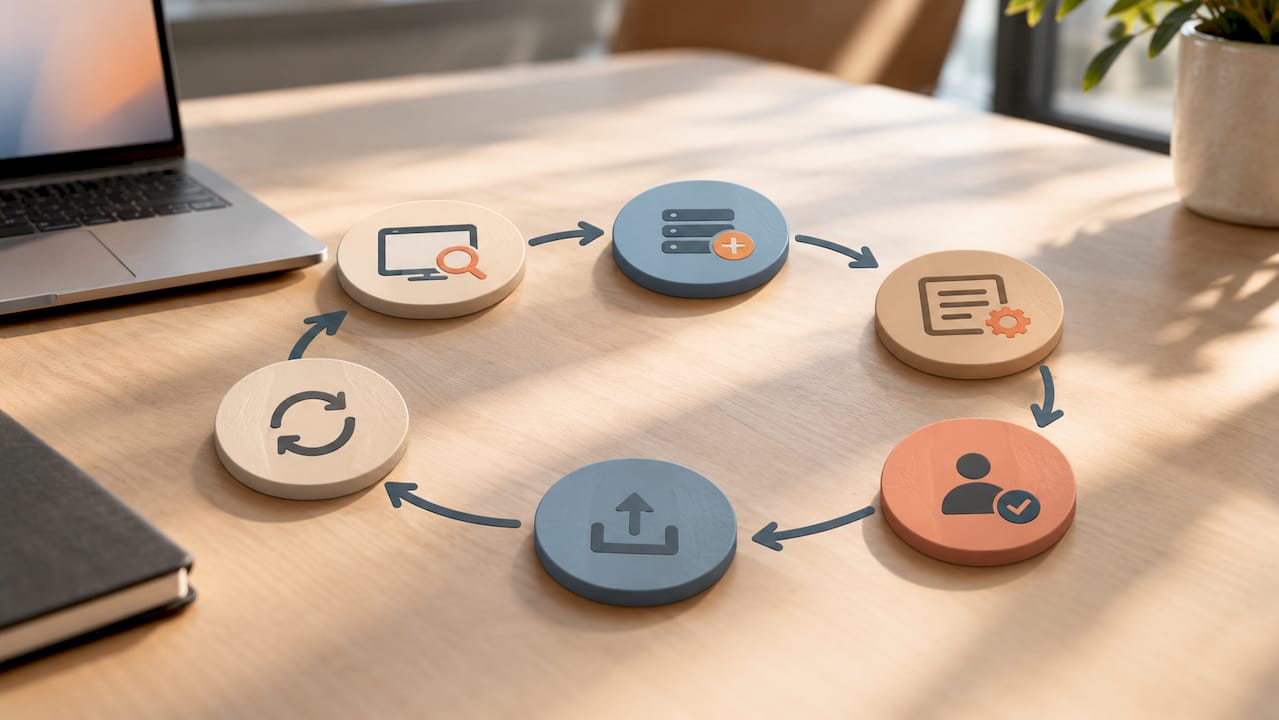
Finally, loop discovery findings back to the people who do the work. SMEs who validated the original candidates are the same people who can confirm whether a deployed automation actually matches how the job is done six months later. Programs that skip this step tend to accumulate automations nobody trusts, because nobody closed the loop between what was found and what got built.
Orchard's Approach: Investigating Work with Activity and Evidence
Orchard helps organizations understand employee activity, software usage, AI adoption, workload patterns, and workflow bottlenecks across teams and applications. These observations can give process owners a starting point for investigating repeated work.
Isaac helps leaders investigate business questions using available activity and evidence, while Studio provides custom dashboards and views. Teams can identify repeated work and choose which automations to enable; findings depend on the systems, activity, and scope made available.
Review Orchard's Trust page for its published security and data-handling information. Confirm capture scope, access, and retention requirements during evaluation rather than assuming a specific deployment method or delivery timeline.
— Katie
Start With One High-Value Desktop Task
Start with one repetitive task, such as invoice reconciliation or new-hire data entry. Establish a baseline, include the people who perform the task, and confirm whether the available evidence captures the variations that matter before deciding what to automate.
Choose one finance or HR workflow to discuss, review the Trust page, and request an Orchard briefing to explore the available evidence and a suitable evaluation scope.