

An automation playbook describes a repeatable workflow: its steps, decision rules, exception handling, and responsibilities. Depending on the tool, it may be written manually, generated from observed activity, or represented as an executable workflow. For procurement, verify what the vendor means by the term and which parts can actually run.
A Playbook worth buying includes:
-
Editable steps you or a teammate can modify without touching code
-
Version history so you know what changed and when
-
A per-run execution trace showing exactly what happened
-
Human-in-the-loop checkpoints for decisions the software shouldn’t make alone
If a process is rule-based, high-volume, and runs through a stable interface, a Playbook is usually the faster and cheaper path. If a clean API already exists and the process is mission-critical, build against the API instead. Playbooks shine where no API exists and the interface is the only door in.
Key Takeaways
Automation Playbooks succeed when they’re generated from clean, segmented UI logs, reviewed by humans before deployment, and tracked against real exception and time-saved metrics.
| Point | Details |
|---|---|
| Definition matters for procurement | A playbook describes a repeatable workflow; its generation method and executable capabilities depend on the tool. |
| Segmentation determines reliability | Clean, normalized logs separate real task steps from noise before a Playbook is synthesized. |
| Track exception rate and MTTR | These two metrics predict maintenance cost better than raw hours-saved figures alone. |
| Pilot before you scale | Set success and exception thresholds appropriate to the process's risk before committing budget beyond the pilot. |
| Evaluate Orchard against the investigation you need | Orchard supports activity and workforce analysis; confirm any required workflow-generation and execution capabilities during evaluation. |
Table of Contents
How Automation Playbooks Are Generated
Playbooks come from processing raw UI logs and turning them into editable workflows that can handle more than one path through a task. Two technical approaches dominate: record-and-replay and reactive synthesis, and the difference matters more than most demos let on.
Record-and-replay captures a single walkthrough and turns it into a linear script. It’s fast to produce but breaks the moment a real user takes a different route. Reactive synthesis takes multiple recorded sessions of the same task, spots the variants, and synthesizes one robot that reacts to different inputs during execution rather than choking on the first exception it meets.
The pipeline behind a well-built Playbook generally runs like this:
-
Recording: capture keystrokes, clicks, and screen context during real work
-
Segmentation and normalization: strip out accidental clicks and hover noise, then group actions into meaningful task steps
-
Pattern discovery: cluster similar sessions to find the routine and its variants
-
Draft synthesis: generate an editable workflow, sometimes with human-in-the-loop steps built in for ambiguous inputs
-
Review and edit: a human checks the draft before it runs unsupervised
-
Execution: the Playbook runs, with logs feeding back into future refinements
Segmentation is the step vendors skip in demos, and it’s the one that determines whether a Playbook survives contact with real work. Skip it, and you get a brittle script disguised as a workflow.
Pro Tip: Ask the vendor to record a task live, in front of you, with at least one deliberate detour (a popup, a wrong click, a different menu path). Watch whether the resulting draft treats that detour as noise or as a real variant. That single test tells you more than a slide deck ever will.
What ROI and Metrics Should You Track?
Playbooks pay off by cutting repetitive desktop work, speeding up delivery, and lowering error rates, but only when you’re automating the right processes and tracking the right numbers. Vague statements like “hours saved” don’t hold up in a budget review.
Track these instead:
-
Time saved per run, measured against the manual baseline
-
Runs per period, so you can see volume trends
-
Exception rate, the share of runs that need human intervention
-
Mean time to repair (MTTR) when a Playbook breaks
-
Playbook creation time, from first recording to production-ready
-
Monthly maintenance cost, including the hours spent fixing broken steps
-
Accuracy and reliability rate across a rolling window of runs
Illustrative calculation: a task taking 12 minutes and occurring 40 times per week consumes 8 hours weekly. Across an assumed 50 working weeks, that is 400 hours with an estimated labor value of $14,000 at $35 per hour. This is the manual baseline, not a savings claim: subtract remaining review work, exceptions, maintenance, and other costs, and confirm whether any released capacity reduces actual spending.
Set expectations early. Historical estimates put initial RPA implementation failure rates at a substantial rate, usually because teams relied on manual flowcharting instead of observed behavior and missed the variants that show up in live use. Playbooks generated from real activity logs address that root cause directly, but they don’t eliminate the need for a disciplined pilot.
How Do You Evaluate a Playbook Vendor?
Insist on operational signals, not feature lists. A platform that can’t show transparent run history, meaningful failure alerts, editable Playbooks with versioning, human-in-the-loop controls, and safe data handling isn’t ready for production, no matter how polished the sales deck looks.
Rank your checklist like this:
-
Must-have: per-run execution traces, editable and versioned Playbooks, human-in-the-loop pause points, local-first or minimized data handling
-
Important: reactive synthesis (not just linear record-and-replay), meaningful failure alerts with diagnostic detail, a sandbox or observability view before go-live
-
Nice-to-have: multi-client or white-label packs, built-in ROI dashboards, prebuilt connectors for common desktop apps
Three demo tests separate real capability from marketing copy:
-
Variant test: record the same task done three different ways and see if the platform synthesizes one flexible Playbook or three broken ones.
-
Failure test: deliberately break a step (change a field, close a window mid-task) and check whether the alert explains what happened or just says “failed.”
-
Edit test: hand the generated draft to someone who didn’t build it and time how long it takes them to understand and modify a step.
On procurement questions, get specifics before you sign anything: is pricing per active user or per seat, is there a minimum monthly spend, do multi-client environments require separate packs, can you get sandbox access before committing, and what’s the actual uptime commitment versus a marketing claim of “high availability”?
What Does a Realistic Pilot Look Like?
Use a focused pilot with success gates before scaling. The six-to-eight-week sequence below is an illustrative planning example, not a standard implementation time or an Orchard delivery commitment; adapt it to process frequency, data access, and review requirements.
-
Discovery and selection (week 1): use process discovery or task mining to find high-volume, rule-based candidates rather than guessing based on who complains loudest.
-
Record (week 1 to 2): capture real sessions across the people who actually do the work, not just one power user.
-
Synthesize (week 2 to 3): generate the draft Playbook and review the segmentation quality before touching logic.
-
Review with subject matter experts (week 3 to 4): have the people who do the job daily check the draft against edge cases.
-
Supervised pilot run (week 4 to 6): run the Playbook with a human watching every execution and logging exceptions.
-
Measure and iterate (week 6 to 8): compare against your baseline metrics and decide whether to scale, revise, or drop it.
Without audit logs and full run history for every pilot execution, you can’t prove any of this to finance or compliance later.
What Are the Most Common Playbook Mistakes?
Most Playbook failures trace back to three causes: poor log quality, automating processes with too many exceptions, and vendors who only ever show the happy path.
-
No segmentation: raw click streams get treated as gospel instead of being cleaned and normalized first. Require the vendor to show you the cleaned trace, not just the final script.
-
Noisy recordings: one distracted session with stray clicks poisons the whole draft. Record multiple clean sessions per process.
-
Interface instability: if the underlying app changes its layout monthly, a UI-based Playbook will break monthly too. Favor stable, mature applications for early automation.
-
Ignoring exceptions: teams automate the 80% happy path and quietly dump the other 20% on whoever’s unlucky enough to be nearby. Require retry logic and clear human handoff points instead.
Pro Tip: Before any contract talk, ask for one live recording of a messy, real task, not a curated demo script. If the vendor hesitates, that’s your answer about how their generation actually holds up outside a rehearsed pitch.
Does Orchard Meet These Buyer Criteria?
Orchard's current offering focuses on employee activity and workforce analytics, software and AI usage, Isaac-assisted investigation, Studio views, and customer-enabled automation. Assess it against the problem you need to solve and verify any additional playbook-specific requirements during a briefing.
| Buyer Criterion | How Orchard Addresses It |
|---|---|
| Activity and workload analysis | Investigate available activity, software usage, and workload patterns |
| AI-assisted investigation | Isaac helps leaders investigate questions using available activity and evidence |
| Custom views | Studio provides custom dashboards and views |
| Customer-enabled automation | Teams choose and enable automations and can track completed runs with estimated time and labor value |
| Data handling | Confirm scope and handling against published information and your deployment requirements |
| Additional procurement requirements | Confirm workflow editing, versioning, supervision, and multi-client requirements directly before relying on them |
Start an Orchard evaluation by defining the business question, available systems and activity, and the evidence needed to judge a result. Agree on scope and timing based on representative work rather than assuming a fixed observation period.
Request an Orchard briefing to discuss your workflow and confirm the capabilities needed for your evaluation.
When Should You Actually Use Automation Playbooks?
The core answer hasn’t changed through any of this: Playbooks work best for high-volume, rule-based desktop tasks running through interfaces stable enough not to break every update cycle. If your process has a low exception rate and clear start and end points, start there. If a mature API already exists for the system involved, build against the API instead. Save Playbooks for the messy, UI-only corners of your operation that nobody’s bothered to script because scripting them by hand was never worth the time.

Get Started With Entertheorchard
Orchard can help teams investigate repeated work, software usage, and workload patterns before deciding what to improve or automate. Combine activity findings with process-owner input to validate the ordinary path and exceptions.
Use Isaac for questions grounded in available activity and evidence and Studio for custom views. For customer-enabled automations, distinguish completed runs and estimated time or labor value from actual changes in spending. Confirm any required workflow-generation, versioning, supervision, or multi-client capabilities during evaluation.
Request an Orchard briefing to discuss scope, supported systems, and evaluation requirements. Review the published security and data-handling information before collecting activity or enabling automation.
Frequently Asked Questions
What's the difference between a playbook and a runbook in automation?
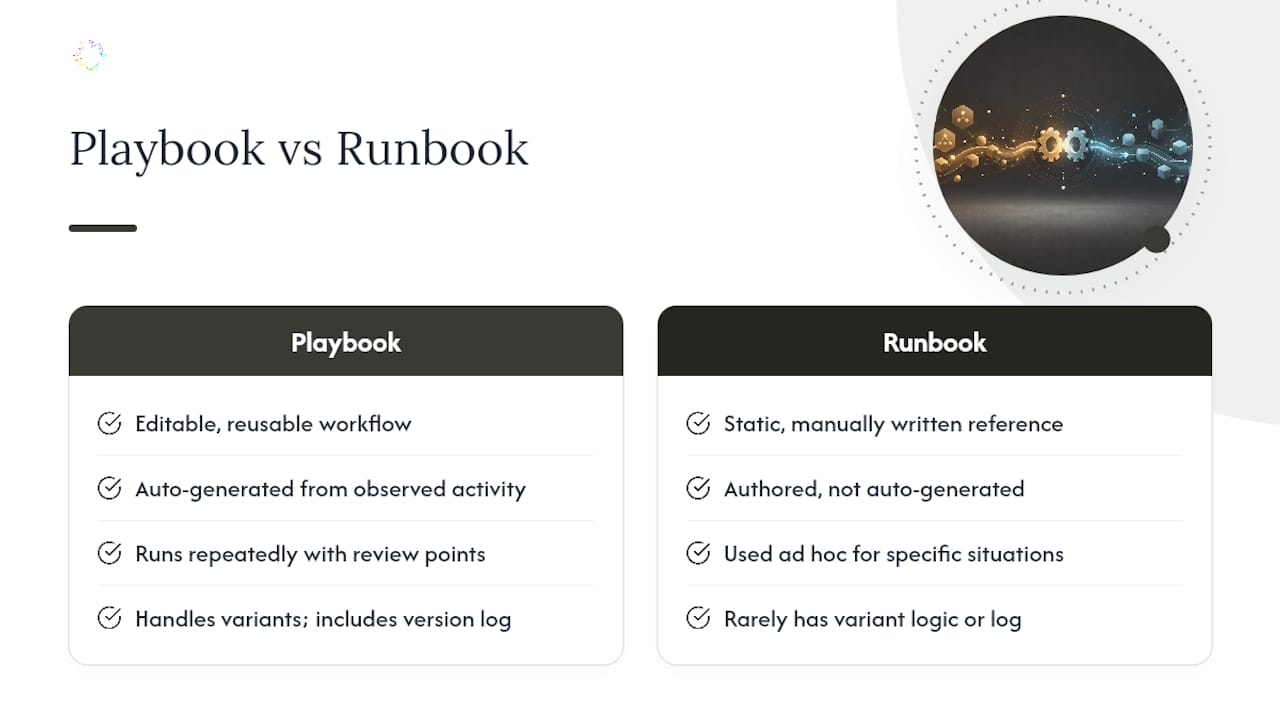
Usage varies by team and vendor. A playbook often organizes the steps and decisions for a repeatable workflow, while a runbook often provides operational instructions. Either may be manually written or executable; check the actual format and capabilities instead of relying on the name.
Is there a standard automation playbook template? There’s no single industry-wide template, but a usable one includes the recorded steps, decision points flagged for human review, variant handling logic, and a version log. Platforms that auto-generate Playbooks from real activity produce this structure automatically instead of requiring you to build it by hand.
What are common automation playbook examples in back-office work? Typical examples include invoice data entry across multiple systems, customer record updates that pull from several applications, report compilation from spreadsheets, and repetitive data reconciliation tasks that involve copying information between platforms with no shared API.
How do you use automation playbooks once they’re generated? Review the draft with the person who actually does the task, edit any steps that don’t match real practice, run it in a supervised pilot mode first, then promote it to unsupervised execution once it clears your accuracy and exception-rate thresholds.
What workflow automation guidelines should guide process selection? Prioritize rule-based, high-volume, stable-interface tasks with clear start and end points and low exception rates. If a reliable API exists for the system, that’s usually a better long-term fit than a UI-based Playbook.
Sources
-
Reactive synthesis of software robots in RPA from user interface logs
-
What Process Discovery is, and How it Affects RPA Success | NICE