

An automation governance framework defines what gets automated, who approves it, and how live workflows are monitored and changed. Its purpose is to make ownership and risk controls clear as the portfolio grows. The guide below outlines those controls and an illustrative roadmap to adapt to your workload and review requirements.
TL;DR:
Effective automation governance should cover all automation touching production data, including attended robots, citizen-developer apps, and AI scripts, to prevent untracked failures and security risks.
Core pillars include clear ownership, real-time monitoring with tiered alerts tied to business SLAs, change management with version control, and regular review cycles to ensure continuous improvement.
A hybrid governance model, combining centralized standards with distributed ownership, adapts well to growing automation portfolios, balancing control and agility.
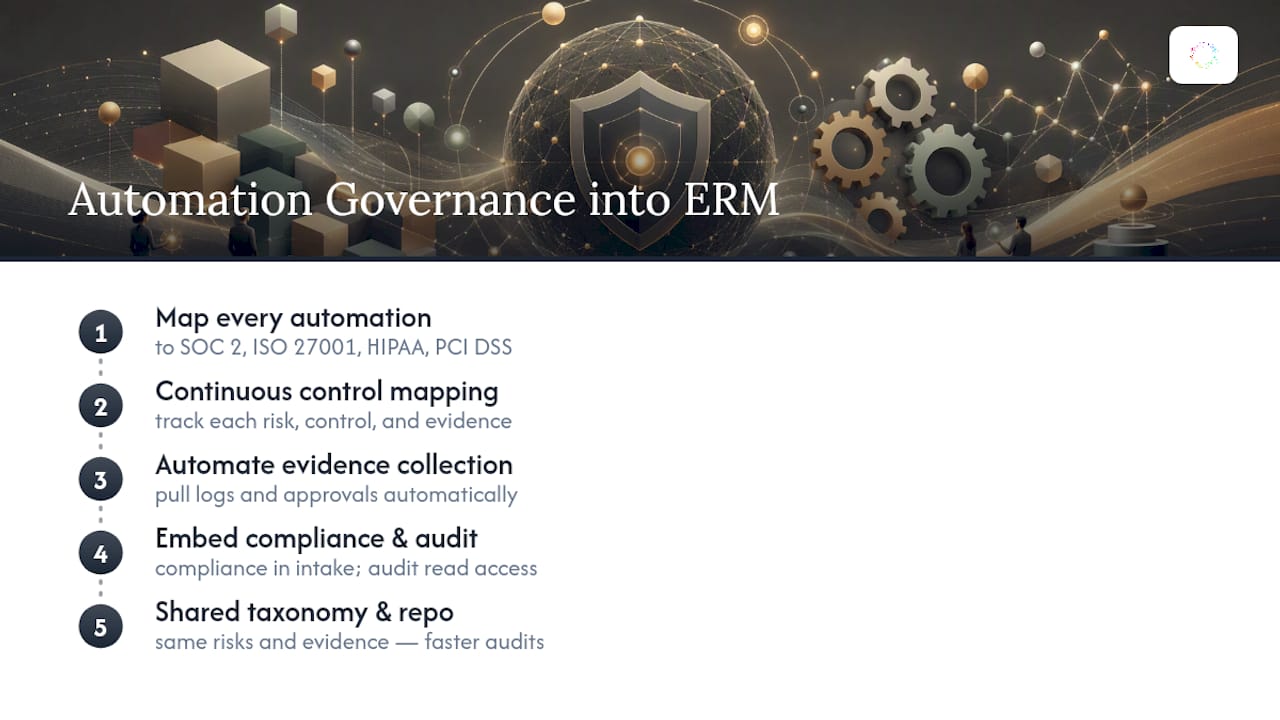
Automation risk management must integrate with enterprise risk frameworks by mapping automations to specific compliance controls and maintaining an automated evidence trail for audits.
Scaling governance requires tiered review processes, scalable monitoring tools, dedicated retirement of legacy automations, and ongoing stakeholder training to prevent bottlenecks and technical debt.
Table of Contents
-
What Does an Automation Governance Framework Actually Cover?
-
Centralized, Hybrid, or Distributed: Which Governance Model Fits?
-
How Does Automation Governance Fit Into Enterprise Risk and Compliance?
-
How Should Governance Scale as the Automation Program Grows?
-
How Do You Train Stakeholders on the New Governance Framework?
What Does an Automation Governance Framework Actually Cover?
The framework applies anywhere automation touches production data or business decisions, not just formal RPA bots on a central server. That means it has to cover attended and unattended robots, low-code citizen-developer apps, and the AI-assisted scripts someone built in a weekend. An academic study of RPA controls maps this territory into four governance areas and 14 control requirements, spanning various controls including access provisioning and change documentation.
Ad-hoc automation skips all of it: no owner, no test record, no shutdown plan if the underlying application changes. Governed automation runs through a Center of Excellence (CoE) or equivalent function that tracks every live process against those controls, often aligning to broader standards like SOC 2 or ISO 27001 where the automation touches regulated data. The distinction matters because scale multiplies risk exposure faster than most teams expect. Ten ungoverned bots is a mess. Two hundred is an incident waiting for a headline.
What Are the Core Pillars of Automation Governance?
Four useful pillars are ownership, monitoring, change management, and review. Define how each applies to your automation portfolio and test whether the controls work in practice.
-
Ownership and accountability: a named process owner and platform owner for every live automation, documented in an asset register, not a spreadsheet someone forgot to update.
-
Monitoring and alerting: real-time dashboards tracking exceptions, run failures, and SLA breaches, tiered by severity so a stalled invoice bot doesn’t page the same on-call engineer as a failed payroll run.
-
Change management: version control, peer review, and a documented approval trail before anything touches a live workflow.
-
Review and improvement: a fixed cadence, commonly monthly performance reviews, quarterly compliance checks, and an annual strategic review with the CoE lead and compliance owner in the room.
Monitoring works best with three alert tiers: informational (logged, no action), warning (reviewed within 24 hours), and critical (paged immediately, with a defined SLA of one to four hours depending on the process).
Pro Tip: Tie your alert tiers directly to business SLAs, not technical severity. A bot failure on a customer-facing refund process deserves a shorter response window than one on an internal weekly report, even if the error looks identical in the logs.
Centralized, Hybrid, or Distributed: Which Governance Model Fits?
A centralized model, one CoE approving and monitoring every automation, gives tight control but becomes a bottleneck once request volume climbs past what a small team can review. A distributed model hands ownership to individual business units, which speeds delivery but tends to produce exactly the inconsistency and shadow automation that governance exists to prevent. Hybrid splits the difference: the CoE sets standards, security baselines, and the intake process, while business units build and own their own workflows within those guardrails.
Most organizations tend to adopt a hybrid governance model as automation initiatives expand beyond initial pilots. Vendor guidance on Automation HQ models describes this as combining enablement with governance, pairing onboarding and training with clear approval gates. Before picking a model, work through these questions:
-
How many business units are actively building automations today, and how fast is that number growing?
-
Does your compliance exposure (finance, healthcare, regulated data) require centralized sign-off on every deployment?
-
Do you have enough CoE staff to review requests without becoming the delivery bottleneck?
Who Owns What in an Automation Governance Model?
Blurred accountability is the fastest way to turn a good framework into a paperwork exercise nobody follows. Four roles need clear, written responsibility:
-
Process owner (business side): defines the workflow, approves exceptions, and signs off that the automation still matches the real business process.
-
Platform owner (technical): manages the automation tooling, credentials, and infrastructure the bots run on.
-
Governance lead / CoE: sets standards, runs the intake queue, and owns the control framework itself.
-
Compliance owner: reviews regulated processes and signs the audit trail before go-live.
Exceptions escalate up this chain: the process owner handles the first tier, the platform owner steps in for technical failures, and the compliance owner gets pulled in only when a regulated process breaches its control boundary. Practitioners who’ve run this at scale describe it working best when CoE direction gets balanced with bottom-up enablement rather than functioning as a pure IT gatekeeper.
How Does the Governance-Aligned Automation Lifecycle Work?
Every automation should move through the same six gates, regardless of who built it or how small it seems.
-
Intake: submit a request with a measurable benefit and risk assessment. HBR’s project-selection guidance is a solid model here: reject candidates with unclear ROI before they consume build time.
-
Development and testing: version control from day one, a written test plan, and a pre-production environment that mirrors live data conditions.
-
Deployment: a formal gate requiring sign-off from the process owner and platform owner, with monitoring hooks live before the bot touches production.
-
Monitoring: dashboards tracking exceptions and uptime from the first run, not bolted on after an incident.
-
Change request: any modification, even a small one, routes through the same review path as new builds. Emergency changes get an expedited lane but still require after-the-fact documentation within 24 to 48 hours.
-
Decommissioning: a retirement checklist that revokes credentials, archives logs, and removes the process from active monitoring.
The controls that matter most at each stage:
-
Intake: written benefit/risk score, sponsor sign-off
-
Build: peer-reviewed code, exception-path tests, not just happy-path tests
-
Deploy: rollback plan documented before go-live
-
Change: impact analysis attached to every request
A gated pre-production environment with mandatory exception-path testing catches the majority of issues that would otherwise surface as production outages.
What KPIs and Audit Trails Does Governance Require?
Four numbers tell you almost everything about the health of an automation program: exception rate, completion rate, cycle time, and uptime. Track them per automation, not just in aggregate, since one broken bot can hide inside a healthy portfolio average.
-
Exception rate: percentage of runs requiring human intervention; investigate anything trending upward over two consecutive weeks.
-
Completion rate: percentage of runs finishing without error.
-
Cycle time: how long a process takes end to end, tracked against its pre-automation baseline.
-
Uptime: availability of the automation against its scheduled run window.
Set response SLAs by tier: critical alerts within one to four hours, warnings within 24 hours. For audit trails, log every run, every exception, who approved every change, and every credential access event. Risk-management platforms built for this map risks directly to controls and automate evidence collection, which turns a quarterly audit from a scramble into a report you can generate on demand.
What Risks Does Automation Governance Actually Prevent?
The recurring failure modes are predictable: hardcoded credentials sitting in scripts, process drift where the automated workflow silently diverges from the real business process, and technical debt piling up because nobody enforced code review. Governance counters each with a specific control: secrets management and role-based access for security, scheduled process audits to catch drift before it causes bad output, and mandatory peer review plus documentation for every build. Framing these controls as guardrails rather than red tape speeds up delivery rather than slowing it, because teams stop rebuilding broken automations from scratch. Tracking hours saved against maintenance cost also surfaces hidden expenses that a simple “bots deployed” count never shows.
Your First 90 Days: A Practical Governance Roadmap
Build the framework in three phases rather than trying to launch it complete on day one. The weeks below form an illustrative planning sequence, not a promised implementation time; adapt them to the scope, risks, and team capacity.
-
Weeks 1 to 4: draft the governance policy, name a governance lead, and stand up a minimal CoE with one process owner and one platform owner per pilot team.
-
Weeks 5 to 8: build the intake form (benefit and risk fields mandatory), run one pilot automation through the full lifecycle, and stand up baseline monitoring with the four core KPIs.
-
Weeks 9 to 12: publish a runbook, launch a KPI dashboard visible to stakeholders, and hold the first monthly review.
Quick wins come from the pilot; the dashboard and review cadence are the longer-term investment.
How Does Automation Governance Fit Into Enterprise Risk and Compliance?
Automation governance shouldn’t operate as an island next to your enterprise risk management (ERM) program. It should feed it. Every automation touching financial reporting, customer data, or regulated workflows creates a risk that your existing ERM framework already has a category for, whether that’s operational risk, third-party risk, or data privacy risk. The mistake most organizations make is running automation risk assessments in a separate spreadsheet that never reaches the enterprise risk register.
The fix is structural, not just procedural. Map every governed automation to the specific compliance frameworks it touches, SOC 2, ISO 27001, HIPAA, PCI DSS, whatever applies, and treat that mapping as a living document the CoE updates every time a new automation goes live. Continuous control mapping, tracking each risk to its corresponding control and the evidence that proves the control works, is what turns an annual audit scramble into something closer to a real-time compliance status check. Platforms designed for this kind of continuous evidence collection pull logs and approval records automatically rather than relying on someone assembling a binder in March.
Include the compliance owner in intake when a workflow touches regulated data, and agree on evidence requirements before deployment. Give internal auditors appropriate access to the relevant records. Shared risk definitions and evidence repositories can reduce repeated collection work, but audit duration depends on scope, evidence quality, and the review process.
How Should Governance Scale as the Automation Program Grows?
The controls that work for 15 automations will not survive 300 unmodified, and pretending otherwise is how governance teams get buried. The first thing to break is manual review capacity: a CoE that reviews every intake request by hand at 15 automations a quarter cannot sustain that pace at 60. The fix isn’t hiring your way out of it indefinitely. It’s tiering your review process so low-risk automations (no regulated data, low transaction volume, easily reversible) get a lightweight self-service approval path, while high-risk automations still get full CoE scrutiny.
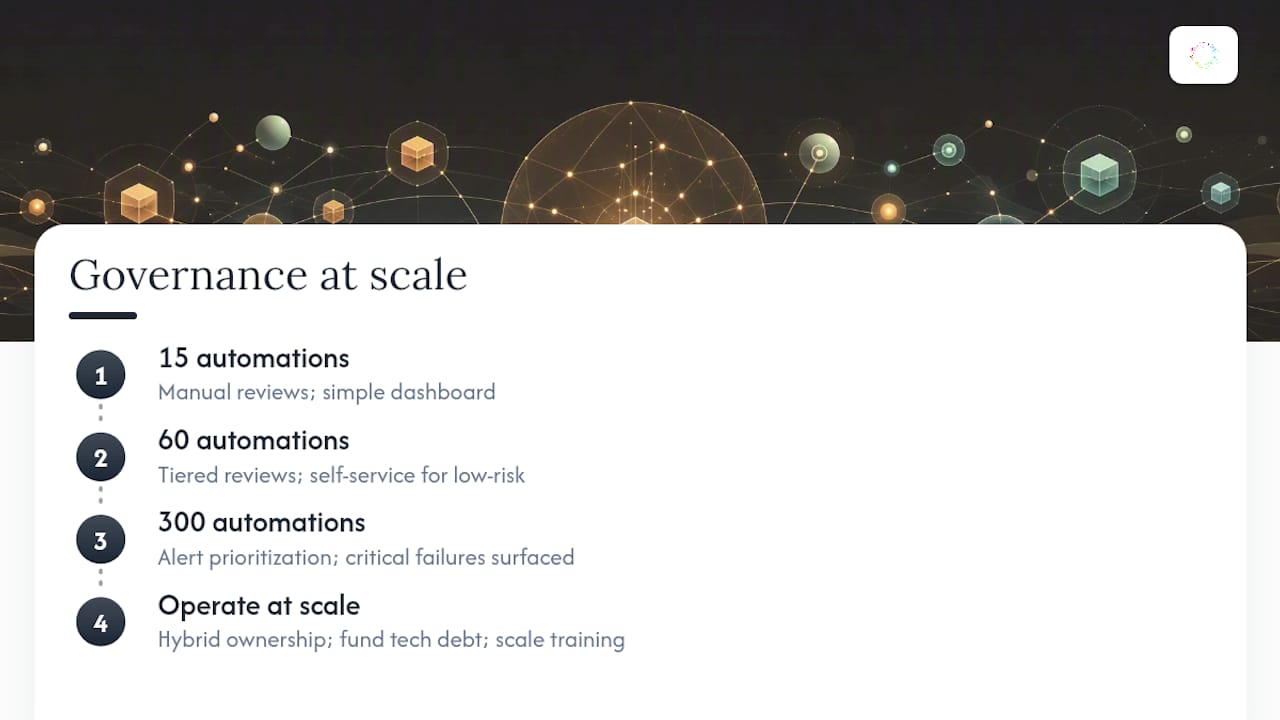
Monitoring infrastructure needs the same tiering. A dashboard that works for 20 bots becomes noise at 200 unless you build alert prioritization into it from the start, surfacing critical failures on regulated processes above routine exceptions on low-stakes workflows. This is also the point where the hybrid governance model earns its keep: centralized standards paired with distributed ownership let individual business units scale their own automation portfolios without funneling every decision through a single team.
Technical debt compounds faster than most programs expect once you cross 50 to 100 live automations, especially when early bots were built before formal standards existed. Budget dedicated time, not just goodwill, for retiring or rebuilding legacy automations that predate your current control requirements. Treat that as a line item in your roadmap, not an afterthought squeezed in during slow weeks.
Finally, scale your training program in lockstep with headcount growth in the CoE and in business units building their own automations. A framework that scaled the technology but never scaled the people who understand it tends to develop the exact shadow-automation problem governance was built to prevent, just with better tooling underneath it.
What Tools Support an Automation Governance Program?
You don’t need a single monolithic platform to run this well, but you do need coverage across four functional categories: intake and workflow management, monitoring and alerting, risk and compliance mapping, and version control for automation code and Playbooks.
For intake, a structured form (even a well-built spreadsheet or a lightweight workflow tool) that forces a benefit and risk score before a request gets queued does most of the heavy lifting. For monitoring, look for dashboards that surface exception rate, uptime, and cycle time per automation rather than as a blended average, since that’s where problems hide. Guidance on designing SaaS workflows that scale covers the operational guardrails that matter here, particularly around monitoring handoffs and change control.
For risk and compliance, dedicated risk-automation platforms handle the control mapping and evidence collection that manual spreadsheets can’t keep pace with once you’re managing dozens of frameworks across dozens of automations. And for environments where automation increasingly overlaps with AI-driven decision-making, governance frameworks built specifically for AI and RPA hybrid environments address the added complexity of data access and human review that pure RPA governance models don’t fully cover.
Version control matters more than most teams initially budget for. Automations change constantly as underlying applications update, and without a versioned record of what changed and why, root-cause analysis after a failure turns into guesswork. Whatever platform you build on, prioritize one that keeps a readable, auditable history of every automation’s logic, not just its uptime.
How Do You Train Stakeholders on the New Governance Framework?
A governance framework that stakeholders don’t understand gets worked around, not followed. Training has to reach three distinct audiences with three different messages, because a one-size-fits-all rollout deck rarely lands with any of them.
Business process owners need to understand why the intake form asks for a risk score and what happens if they skip a change request, framed around the outcome they care about: fewer surprise outages on the workflows they depend on. Technical builders, whether CoE developers or citizen developers in business units, need hands-on training on version control, exception-path testing, and the specific standards your framework enforces, not just a policy document to read once. Executive sponsors need the KPI dashboard explained in terms of risk reduction and hours saved, since that’s the language that keeps governance funded past its first budget cycle.
Change management works better as an ongoing cadence than a one-time launch event. Pair the initial rollout with office hours during the first 90 days, where builders can ask questions about the new intake process before they hit a wall. Reinforce the framework at the monthly performance review by walking through a real exception or near-miss, since a concrete example lands harder than a policy reminder. And revisit training every time the framework itself changes, a new control requirement, an updated escalation tier, because stale training is often worse than no training, since it teaches people a process that no longer matches reality.
Where Orchard Fits Into Secure Automation Governance
Orchard can contribute activity and software-usage evidence to process reviews, helping owners investigate repeated work, workload patterns, and workflow bottlenecks. Combine those findings with documented requirements, an automation inventory, and validation by the people responsible for the workflow.
Isaac supports business questions using available activity and evidence, and Studio provides custom dashboards and views. These capabilities do not replace the approval records and control testing your governance program requires. Review Orchard's Trust page for its published security and data-handling information.
— Katie
Automation Governance That Doesn’t Slow You Down
Start your governance program with named owners, a maintained inventory, and risk-based review. Orchard can help teams examine employee activity and software and AI usage within the available scope, so process reviews can consider evidence alongside interviews and existing documentation.

Teams can identify repeated work, choose which automations to enable, and track completed runs with estimated time and labor value saved. Estimated capacity value is not a guaranteed financial return or proof of compliance. Request an Orchard briefing to discuss your evidence needs and confirm which controls must be provided by your execution and governance systems.
Sources
For deeper study beyond this framework, the academic control-requirements study is the strongest primary source on the 14 controls referenced throughout. Pair it with UiPath’s governance white paper for vendor-side lifecycle guidance, and HBR’s project-selection framework for intake criteria.