

Treat change management as an ongoing program, not a one-time event tied to a single rollout. If you’re launching or scaling automation, your first three moves should be a targeted impact analysis, a governed pilot with clear approval gates, and a dedicated budget line for change management itself, not an afterthought buried in the IT line.
The urgency is real. Forrester’s 2024 survey found that a large majority of companies plan to invest in generative AI, yet the teams deploying these tools openly admit they lack change-management readiness. That gap is where automation projects quietly die.
Start here:
-
Run a change impact analysis before you build anything.
-
Pilot with human-in-loop approval, not a full rollout.
-
Fund change management as a line item, not a hope.
Key Takeaways
Automation change management works when it runs as a continuous, evidence-fed program rather than a one-time rollout tied to a launch date.
| Point | Details |
|---|---|
| Start with impact analysis | Map affected roles, processes, and exception handling before building any automation. |
| Fund change management directly | Budget for a change lead, training, and support as explicit business case line items. |
| Pilot with rollback criteria | Set acceptance metrics and rollback triggers before launch, not after a failure. |
| Build the evidence loop | Feed execution telemetry and exceptions back into Playbook revisions on a regular cadence. |
| Evaluate platforms that capture real work | Orchard helps teams investigate activity and workload patterns that can inform change planning; process owners should validate the scope and findings. |
Table of Contents
-
What Tooling and Governance Controls Keep Automation Change Safe?
-
Where Does a Platform Like Orchard Fit Into the Evidence Loop?
-
Get Your Automation Change Management Program Off the Ground
Why Change Management Matters for Automation Initiatives
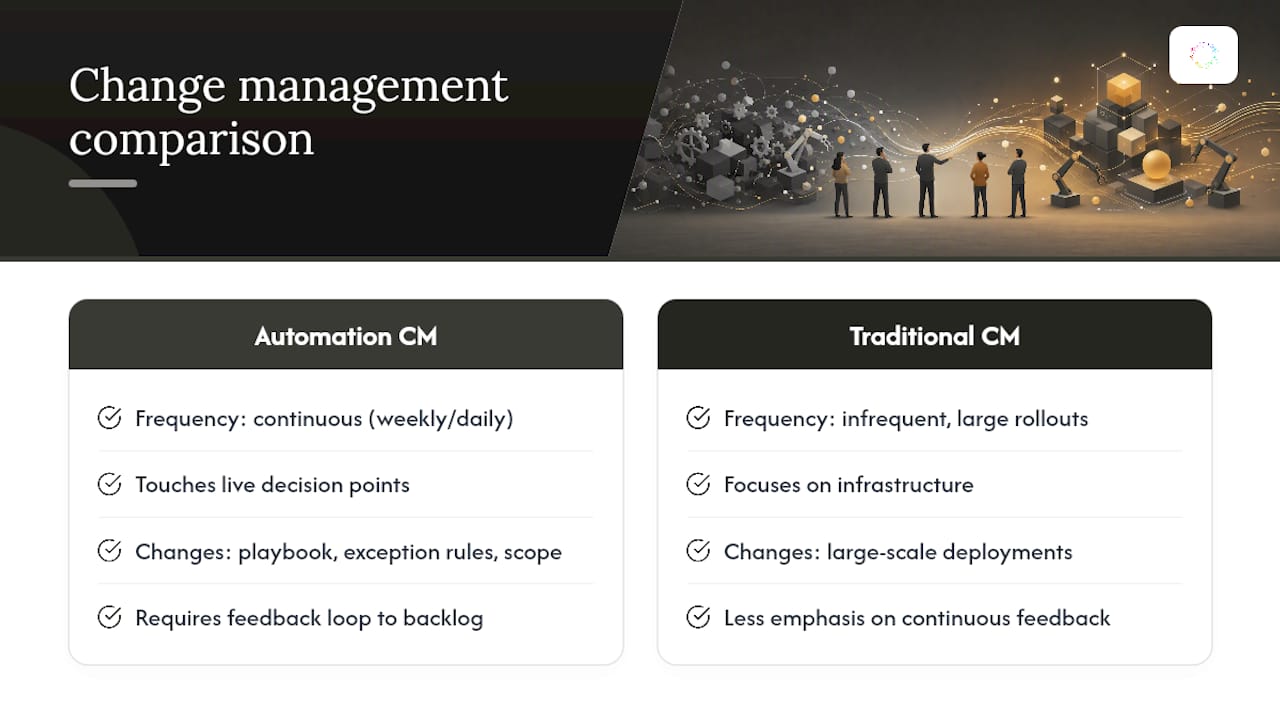
Automation moves faster than traditional software rollouts, and that pace is exactly what breaks conventional change management. A new ERP module might change once a year. An automation Playbook can change weekly as upstream apps update, exceptions surface, or a team tweaks its process. Change management for automation has to run at that same cadence, or it falls permanently behind the thing it’s supposed to govern.
This isn’t a tooling problem first. It’s a trust problem. Employees who fear automation will eliminate their role tend to withhold the exact process knowledge that makes automation work in the first place. Forrester’s research points to a specific mismatch: leaders often believe their organization is more change-ready than employees actually experience it to be. That perception gap widens every time automation ships without explanation.
Left unmanaged, automation initiatives tend to fail in predictable ways:
-
One-off bots built for a single use case go stale the moment the underlying process shifts, creating “dead automation” nobody maintains.
-
Governance gaps let automated changes collide with scheduled maintenance windows or compliance freezes.
-
Scheduling conflicts between automated deployments and business-critical periods erode confidence fast.
-
No mechanism exists to route exceptions back into a backlog, so small breakages become permanent workarounds.
What Principles Should Guide Automation Change Management?
Automation-specific change management borrows from Kotter and ADKAR, but it needs four adaptations that traditional frameworks don’t emphasize enough.
-
Make it continuous, not episodic. Run change management as a repeating cycle of small pilots rather than one large go-live. Each cycle produces evidence for the next.
-
Build an evidence loop. Capture execution telemetry, exceptions, and time-saved data, then feed that data back into Playbook revisions. Automation that doesn’t improve itself eventually breaks; a documented analysis of common automation pitfalls ties most post-rollout failures to exactly this missing feedback mechanism.
-
Keep humans in the loop on higher-risk decisions. Low-risk, well-understood steps can run unattended; anything touching customer data, financial approvals, or compliance needs a human checkpoint.
-
Let governance travel with the artifact. Version control, approval history, and rollback instructions should live with the automation itself, not in a separate policy binder nobody opens.
Pro Tip: Treat your first automation pilot as a data-gathering exercise, not a proof of concept. The goal isn’t to prove automation works. It’s to generate the exception data you’ll need to build the second, better version.
How Do You Build a Practical Automation Change Plan?
A workable plan has five stages, each with its own deliverable and owner.
-
Change impact analysis. Map every process, role, and system touched by the automation. List who approves exceptions today, what happens when the process breaks, and which roles will see their day-to-day tasks shift. This document becomes your baseline for measuring adoption later.
-
Business case with CM line items. A business case that only counts hours saved from automation and ignores the cost of training, governance, and support staffing will underfund the program from day one. Budget explicitly for a change lead, training materials, and a support channel for the first 90 days.
-
Pilot design. Define scope tightly: one team, one process variant, a fixed timeframe. Set acceptance metrics upfront, task completion rate, error rate, time saved, and decide what triggers a rollback before you start, not after something breaks.
-
Training and reskilling. Skip the all-hands seminar. Role-based microlearning tied to the actual Playbook steps a person will use works better, backed by a small train-the-trainer group in each affected team who can answer questions in real time.
-
Rollout cadence and sustain model. Roll out in waves tied to pilot evidence, not a fixed calendar date. Build a standing review cadence (biweekly works for most teams) where exception data and usage telemetry get reviewed and fed back into the Playbook.
What each stage must produce:
-
A documented list of affected roles and processes.
-
A budget line covering training, governance, and support.
-
Written rollback criteria agreed on before the pilot launches.
-
Adoption metrics tracked from week one, not added retroactively.
How Do You Build Stakeholder Trust and Make Training Stick?
Different stakeholders need different messages, and sending the same deck to executives and frontline staff is a fast way to lose both audiences. Executives want to see risk controls and ROI tracking. Managers want to know how team output changes. Frontline staff want a straight answer to one question: does this take my job, or take the parts of my job nobody enjoys?

Transparency closes the trust gap faster than reassurance does. Showing people the actual decision rules inside a Playbook, and letting them propose edits, does more to build confidence than any town hall. Forrester’s research suggests the gap between leadership’s confidence and employee perception is one of the biggest predictors of automation program failure.
Practical training tactics that hold up in the field:
-
Run pilot cohorts of 5 to 10 people before wider rollout, and use their feedback to revise training materials.
-
Use microlearning modules tied to specific Playbook steps rather than broad “intro to automation” sessions.
-
Train a small group of train-the-trainers in each department who can field questions without escalating to IT.
-
Track usage rates, support ticket volume, and periodic confidence surveys as your core adoption signals.
What Tooling and Governance Controls Keep Automation Change Safe?
Automation change becomes auditable when it lives in the same version-controlled world as your other production systems. Google Cloud’s operational excellence guidance recommends infrastructure as code, CI/CD pipelines, and automated testing specifically to keep changes repeatable and traceable, and the same logic applies directly to automation Playbooks and workflow configurations.
A few controls do most of the work:
-
Version control on automation artifacts. Every Playbook edit should be a tracked change with an owner and a reason, the same way a code commit works.
-
CI/CD-style testing gates. Test a Playbook change against sample data before it touches live work, catching regressions before they hit production.
-
Change templates and runbooks. AWS Change Manager offers a useful model here: pre-approved templates for low-risk changes, full approval flows for high-risk ones, and a shared Change Calendar that prevents automation deployments from colliding with blackout periods or compliance freezes.
-
Compliance-as-code. Tools built around this pattern, like the approach demonstrated in change-automation-core, can meaningfully cut the manual documentation overhead that normally comes with formal change approval.
For teams managing configuration across cloud environments alongside automation, the control principles are nearly identical. This overview of cloud hosting control models makes the same case for clear ownership and rollback paths that automation governance needs.
Where Does a Platform Like Orchard Fit Into the Evidence Loop?
Change impact analysis needs evidence about the current process as well as input from the people affected. Orchard's employee activity and workforce analytics can help investigate software usage, workload patterns, and repeated work across the available scope.
Use this evidence as an input to change planning, with responsibilities kept clear:
-
Ask process owners to validate the findings and document affected roles, exceptions, and approval requirements.
-
Review completed customer-enabled automation runs and estimated time and labor value alongside adoption and quality metrics; estimates do not prove reduced spending.
-
Agree on human review points, rollout criteria, and recovery procedures for the chosen implementation before enabling it.
Pro Tip: Before writing your impact analysis from scratch, run a short discovery period with a platform that observes actual work. It often surfaces exceptions nobody remembered to mention in the interview.
Review Orchard's published security and data-handling information and confirm the controls required for your proposed scope as part of the evaluation.
What the Research Actually Tells Us About Automation Change
Automation can change after go-live as applications, inputs, and business rules change. A change plan should therefore include ongoing ownership, maintenance, and communication as well as launch activities.
The conventional playbook also underweights the trust problem. Executives assume a well-written FAQ solves employee resistance. It doesn’t. What actually moves the needle is showing people the decision rules an automation follows and letting them edit the parts that are wrong, which is a fundamentally different posture than “communicate the change.”
Build a feedback mechanism before expanding a pilot. Capture exceptions, assign an owner to investigate them, and use the findings to revise the process, training, or implementation. A launch date alone does not establish that the automation will remain reliable.
Get Your Automation Change Management Program Off the Ground
A useful change plan combines evidence about current work with discussion of how roles and responsibilities will change. Orchard can help teams investigate available activity and workload patterns; those findings still need interpretation and validation by the people responsible for the process.

Isaac supports investigation using available activity and evidence, and Studio provides custom dashboards and views. Request an Orchard briefing to discuss the scope of your change initiative and the evidence needed for a pilot, including how to distinguish estimates from observed outcomes.
Frequently Asked Questions
What is automation change management?
It’s the discipline of planning, communicating, and governing the organizational and process shifts that come from deploying automation, distinct from general IT change management because automation changes far more frequently and touches live decision points, not just infrastructure.
How is change management for automation different from traditional IT change management?
Traditional change management usually governs infrequent, large-scale rollouts. Automation change management has to handle continuous, smaller changes, an updated Playbook, a new exception rule, a scope expansion, on a weekly or even daily basis.
What causes automation initiatives to fail after a successful pilot?
The most common cause is the absence of a feedback mechanism. When upstream processes shift and nobody routes the resulting exceptions back into the automation backlog, the automation quietly becomes unreliable until someone abandons it.
How do you measure automation change management success?
Mix behavioral data (usage rates, task completion), operational signals (error rates, support tickets), and people metrics (confidence surveys) rather than relying on a single adoption number.
Do we need dedicated change management software for automation?
Not necessarily dedicated software, but you do need the underlying capabilities: version control on automation artifacts, approval workflows for higher-risk changes, and a mechanism for capturing execution data. Tools like AWS Change Manager offer some of these controls natively; others build similar patterns using compliance-as-code approaches.