

Attended automation is typically triggered or supervised by a person during interactive work. Unattended automation follows configured triggers or schedules, with exception handling and oversight still required. Choose the mode based on interaction needs, session architecture, risk, and recoverability—not only whether the steps appear repetitive.
-
Attended: runs during an active, logged-in session, triggered by a person
-
Unattended: runs on a schedule, API call, or event, no user session required
-
Hybrid: unattended does the prep work, attended finishes with a human decision
Key Takeaways
Choosing attended versus unattended automation comes down to whether a human needs to make a judgment call during the task or only review the result afterward.
| Point | Details |
|---|---|
| Definitions matter first | Attended runs in an active session with human input; unattended runs on a schedule or event with no user logged in. |
| Match volume to mode | High-volume, repeatable work fits unattended; variable, judgment-heavy work fits attended. |
| Never mix hosts | Attended and unattended bots cannot run on the same machine due to conflicting session requirements. |
| Credentials need separation | Unattended bots require admin-managed service accounts; attended bots stay capped at the user’s own permissions. |
| Discovery drives accuracy | Entertheorchard learns from real desktop work to classify tasks and generate editable Playbooks before deployment. |
Table of Contents
Attended vs Unattended Automation: The Core Definitions
Attended automation is initiated by a person and runs inside their active desktop session. Think of it as a bot that sits next to an employee and does the repetitive part of their job on command, a keystroke or button click starts it, and it runs using that person’s own login and permissions.
Unattended automation works differently. It runs on a schedule, an API call, or a triggering event, with nobody logged into the machine. TechTarget notes that attended bots activate when a user is physically at the computer, while unattended bots execute without any active session at all. That distinction, session-bound versus session-free, is the single most important fact in this entire topic.
Vendor documentation muddies this with alternate labels. Here’s how to translate them:
-
Assisted vs unassisted — same split as attended vs unattended, just older terminology from the early RPA vendors.
-
Front-office vs back-office — attended lives in front-office work (an agent, a rep, a caseworker), unattended lives in back-office batch jobs.
-
Human-in-the-loop vs lights-out processing — a more technical way of saying the same thing: does a person touch this step, or not.
Knowing these synonyms matters when you’re comparing platforms, because two vendors describing identical architecture can use completely different words for it.
What Technical Differences Separate the Two Modes?
The differences go deeper than “with a person” or “without one.” Trigger mechanisms, session state, credential handling, and monitoring all diverge sharply between the two modes.
-
Triggers: attended bots start with a hotkey, button, or voice command; unattended bots start on a cron schedule, an API call, or a queue event.
-
Session state: attended requires an unlocked, interactive desktop session; unattended typically runs on a locked, disconnected, or headless machine.
-
Credentials: attended bots inherit the logged-in user’s permissions; unattended bots run under dedicated service accounts with their own privilege scope.
-
Error handling: attended bots can pause and hand a problem back to the human mid-task; unattended bots need automated retry logic and escalation paths since no one is watching in real time.
-
Monitoring: attended activity shows up in per-user logs; unattended activity needs centralized orchestration dashboards since dozens of bots may run simultaneously across a server farm.
Pro Tip: Before you scope a pilot, check whether the target application even supports headless execution. Some legacy desktop software only renders correctly in an interactive session, which quietly forces a task into attended mode regardless of your automation ambitions.
Which Business Processes Fit Attended or Unattended Automation?
The clearest way to pick a mode is to look at how real teams already use both.
Attended automation examples show up constantly in customer-facing roles. A contact-center agent triggers a bot to pull a customer’s account history the instant a call connects. A loan officer clicks a button to auto-fill a mortgage application from three separate systems instead of copying data by hand. TTEC points to exactly this kind of desktop-assist pattern, where the bot helps the human work faster without taking over the decision.
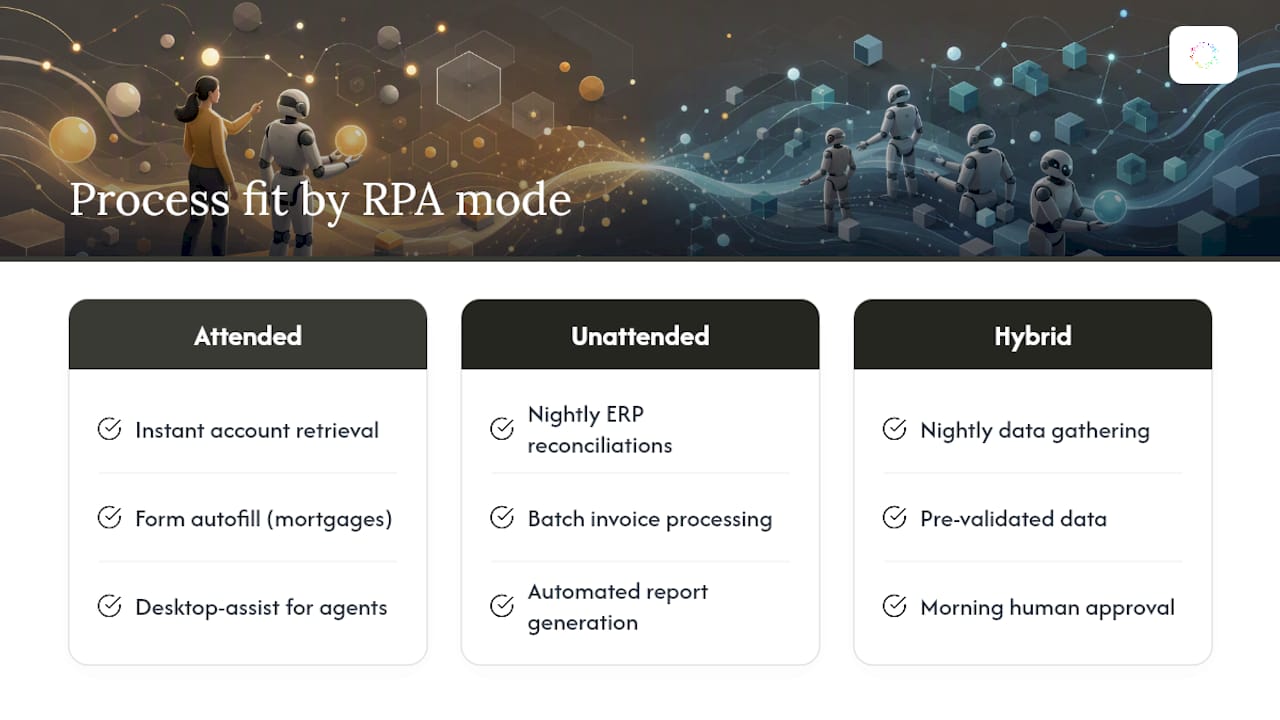
Unattended automation examples run in the background where consistency matters more than speed of judgment. Nightly financial reconciliations across ERP systems. Batch invoice processing for accounts payable. Report generation that pulls from five databases and emails a summary before anyone arrives at their desk.
Many real workflows split the difference. Unattended bots gather and validate data overnight; an attended bot then presents that pre-processed information to a human the next morning, who makes the final call and clicks approve. That handoff pattern is often where the biggest returns hide.

When you’re prioritizing pilots, watch two numbers: hours reclaimed per week and error rate before versus after. A process that eats four hours a week and has a high manual error rate is a better first bet than one that’s fast already but rarely goes wrong.
Security and Governance Rules You Can’t Skip
Unattended bots need admin-managed credential vaults and dedicated service accounts, never a shared login scraped from a spreadsheet. TechTarget is direct about this: unattended automation’s suitability for repeatable batch work comes with a requirement for properly provisioned, admin-controlled credentials with elevated permissions scoped to exactly what the job needs.
Attended bots follow the opposite rule: they should never have more access than the human running them. Never grant an attended bot elevated rights just because it’s convenient. That breaks least-privilege design and creates an audit blind spot the moment someone asks “who actually approved this transaction.”
-
Provision unattended service accounts separately from any individual employee’s credentials.
-
Log every credential use for unattended jobs so audits can trace exactly which bot touched which system and when.
-
Keep attended bots capped at the logged-in user’s existing permission set, nothing more.
-
Never host attended and unattended bots on the same machine or machine group.
That last rule isn’t a best practice, it’s a technical hard stop. Microsoft’s automation guidance confirms attended automation requires an active, unlocked session while unattended requires a disconnected or signed-out state, and those two conditions cannot coexist on one host. Mixing them causes execution failures, not just inefficiency. Audit trails also diverge sharply here: because unattended bots operate under isolated service credentials, they tend to generate cleaner, more traceable logs than attended bots running under a person’s own session identity.
How Hybrid Automation Combines Attended and Unattended Work
Hybrid patterns don’t mix attended and unattended on one machine, they hand work between separate processes using queues, events, or API triggers. That keeps the session-state conflict from ever happening while still linking the two modes into one workflow.
-
Unattended bots process a batch overnight and drop results into a queue.
-
An attended bot picks up flagged exceptions the next morning for a human to review.
-
AI-augmented attended bots use real-time transcription or natural language processing to surface a suggested response while an agent is still on a live call, letting the human validate rather than start from scratch.
Hybrid makes sense whenever a process has clear repeatable segments and one or two points where a judgment call genuinely can’t be automated away. TechTarget describes this AI-augmented pattern as one of the fastest-growing hybrid use cases in contact centers.
How Do You Decide Between Attended and Unattended?
Run through these questions before committing to a deployment model:
-
Does a human need to make a judgment call mid-task, or just review the outcome after? Judgment mid-task points to attended; review-after points to unattended.
-
What’s the volume? A handful of transactions a day rarely justifies unattended infrastructure; thousands a night usually demands it.
-
How variable is the process? High variability with edge cases favors attended, where a person can adapt on the fly. Deloitte’s guidance, cited by TechTarget, frames attended automation as essential wherever rules are complex or unpredictable.
-
What privileges does the task actually require? If it needs elevated system access, budget time for a proper service account, not a shortcut.
-
Is an interactive session even available when the work needs to happen? Overnight jobs, by definition, can’t be attended.
Pro Tip: Scope your first pilot narrow. Pick one process, one mode, and one measurable outcome, hours saved or errors avoided, before you try to build a mixed attended/unattended program across a department.
How Orchard Helps Investigate Automation Candidates
Orchard helps teams investigate repeated work through employee activity and workforce analytics. Isaac can explore the available evidence, and Studio can organize relevant views. Use those findings with process-owner input to assess where interaction, exception handling, and human review are needed.
What the Data Actually Tells You to Prioritize
The conventional advice treats attended and unattended as a binary choice you make once, at the start of a project. That’s backwards. The processes worth automating rarely announce their mode upfront. A task that looks like a clean unattended batch job often has a human exception buried three steps in, one that only shows up after you’ve already built the bot the wrong way.
What the research actually supports is starting from observed behavior, not assumed process maps. Deloitte’s framing, that attended fits complex or unpredictable rules while unattended fits consistent repeatable ones, only works if you know in advance which category a task falls into. Most teams don’t, because they’re documenting a process from memory instead of from what people actually click.
Observe representative work and confirm exceptions before selecting an automation mode. Combine activity evidence with process-owner interviews and technical testing, including session behavior, credentials, and failure recovery.
— Katie
Explore Your Automation Requirements With Orchard
Orchard can help reveal repeated activity and slow handoffs across the systems and scope your organization makes available. Treat the findings as a starting point for deciding which workflows to investigate and where people need to remain involved.

Your team chooses which supported Orchard automations run, when they run, and where review is required. Request an Orchard briefing to confirm execution modes, session requirements, credential handling, and controls for your candidate workflow.
Sources
-
Attended vs. unattended RPA bots: Key differences | TechTarget
-
Attended vs. Unattended RPA: It Doesn’t Need to be an … | TTEC