

Use an API when it provides the access, reliability, volume, and latency your integration needs. Consider RPA where suitable API access is unavailable and interface automation is supportable. Compare implementation effort, security, and ongoing maintenance for your specific workflow; either approach may form part of a hybrid design.
TL;DR:
APIs are best suited for real-time, high-volume, and scalable data exchanges that require low latency and structured, auditable logs.
RPA can help with legacy or restricted systems where suitable API access is unavailable; deployment time depends on the workflow and controls required.
Combining APIs and RPA in hybrid architectures allows organizations to handle both modern and legacy systems efficiently.
Proper governance, versioning, and regular process review are essential to prevent technical debt with either approach.
Activity insights from Orchard can help identify repetitive work to investigate before choosing an API integration, RPA, or another improvement.
Table of Contents
API vs RPA: What Actually Separates the Two
The confusion around API vs RPA usually comes from treating them as competitors. They’re not. They solve different problems, and the analyst consensus at TechTarget frames the choice as architectural, not stylistic. An API is a contract between two systems. RPA is a bot pretending to be a person clicking through a screen. Once you see it that way, the rest of the decision gets a lot easier.
What Is RPA and How Does It Work?
Robotic process automation, or RPA, automates work by mimicking human actions inside a user interface. A bot logs in, clicks buttons, copies fields, and pastes data exactly the way a person would, just faster and without coffee breaks. Most platforms build this through record-and-playback tools: you perform the task once, the software captures the clicks, and rule-based logic handles the branching decisions afterward.

RPA’s biggest advantage is that it doesn’t need permission from the system it’s automating. TechTarget’s analysis notes that RPA emulates human interaction specifically because it’s built for systems that don’t expose APIs, which makes it the practical option for legacy software and locked-down portals.
The trade-offs are real:
-
Fragile to change: move a button three pixels and the bot can break.
-
Slower per transaction than a direct API call.
-
Runs through a user session, so visibility depends on account-level logging rather than structured API logs.
-
Scales poorly when volume climbs into the thousands of transactions per hour.
RPA buys speed today at the cost of ongoing babysitting tomorrow.
Where RPA Actually Gets Used
RPA earns its reputation in specific, repeatable situations rather than as a general-purpose fix. Four scenarios come up constantly:
-
Invoice processing and data entry from vendor portals or accounting tools that have no exposed API, where someone would otherwise retype numbers by hand.
-
HR onboarding steps that require navigating benefits portals, background-check systems, or payroll dashboards built decades before anyone thought about integrations.
-
Government and banking portals, many of which still run on interfaces designed for humans, not machines, with no API access on offer at any price.
-
One-off migrations and bulk uploads, where building a permanent integration for a task you’ll run twice makes no financial sense.
Notice the pattern: RPA wins when the system is old, access is restricted, or the job is temporary. It’s a bridge, not a foundation.
What Is API Automation and How Does It Work?
An API, or application programming interface, is a defined set of rules that lets two pieces of software exchange data directly, without a human or a bot pretending to be one. Most business integrations run on REST-based web APIs, though internal APIs (connecting a company’s own systems) and partner APIs (shared with vendors or clients) show up constantly too.

The tooling around APIs has matured fast. Connectors, middleware, and iPaaS platforms now handle a lot of the plumbing that used to require custom code, offering prebuilt templates and governance features that cut integration time significantly. IBM’s overview of API integration describes this shift toward API management tooling as central to building modular, auditable systems.
What you get in exchange for the setup work:
-
Low latency, often measured in milliseconds rather than the seconds an RPA click-sequence needs.
-
Structured, scalable throughput that holds up under high transaction volume.
-
Clean audit trails since every call is logged with a timestamp, payload, and response.
-
Reusability: build the connector once, use it across a dozen workflows.
The catch is upfront effort. Building or configuring an API integration takes developer time, and the whole thing depends on the API staying stable and accessible.
Where APIs Are the Obvious Choice
APIs shine anywhere speed and scale matter more than flexibility. A few patterns show up across nearly every industry:
-
Real-time order confirmations, payment processing, and event-driven workflows where a customer is waiting on the other end and a five-second delay is a five-second complaint.
-
High-volume SaaS-to-SaaS integrations, like syncing a CRM with a marketing platform across thousands of records daily.
-
Reusable services for authentication, payments, address validation, and analytics. MuleSoft points out that APIs let teams lean on proven functionality instead of rebuilding it, which is a major reason development speeds up once an API layer exists.
-
Partner ecosystem integrations, where a scalable pipeline needs to handle unpredictable spikes in traffic without falling over.
Healthcare offers a clean example of why standards matter here: the FHIR standard gives hospitals and software vendors a common language for exchanging patient data, which cuts compliance risk in ways an RPA bot clicking through an EHR screen never could.
API vs RPA: The Trade-offs Side by Side
Put the two approaches next to each other and the differences stop being abstract.
-
Speed: API calls run in milliseconds; RPA works at the pace of a simulated click, typically seconds per action.
-
Scale: APIs handle high-volume, real-time demand well; RPA tends to bog down past moderate, batched workloads.
-
Fragility: a UI redesign can break an RPA bot overnight; a well-versioned API rarely changes without warning.
-
Auditability: APIs produce structured, timestamped logs built for compliance review; RPA logging is tied to a user session and is harder to reconstruct after the fact.
-
Cost shape: APIs demand engineering investment upfront and then run cheaply; RPA is cheap to start but racks up maintenance cost every time the underlying interface shifts.
None of this makes RPA the “worse” option. It makes RPA the temporary option in most cases, and the permanent one only when no API will ever exist. The TechTarget analysis puts it plainly: using RPA in place of an available API tends to create technical debt that someone eventually has to pay down.
Four Questions to Choose Between API and RPA
Run any process through these four questions before you build anything.
-
Is a usable, documented API actually available and accessible to your team? Not “does the vendor mention an API somewhere on their site” but “can you get credentials and a sandbox this week.”
-
What volume and latency does the process actually need? A once-a-day batch job has very different requirements than a customer-facing checkout flow.
-
Is this process temporary or strategic? A migration you’ll run once looks nothing like a workflow you’ll depend on for the next five years.
-
What is your time-to-value window and budget? Estimate both options using the actual access requirements, testing effort, exception handling, and maintenance responsibilities.
Match your answers to an outcome: build API-first with RPA as a fallback for edge cases, deploy RPA now with a documented migration plan once an API becomes available, or run a hybrid orchestration layer that routes work to whichever method fits each step.
Pro Tip: Run a capability analysis before building automation logic. Confirm whether an existing API or native integration can meet the requirement without a new desktop automation.
How RPA and APIs Work Together in Practice
Hybrid architectures aren’t a compromise. They’re the standard setup in any organization mature enough to have automated more than one process. TechTarget describes this as the common pattern: an API-first backbone handling the bulk of integration traffic, with RPA adapters plugged in wherever a legacy system refuses to cooperate.
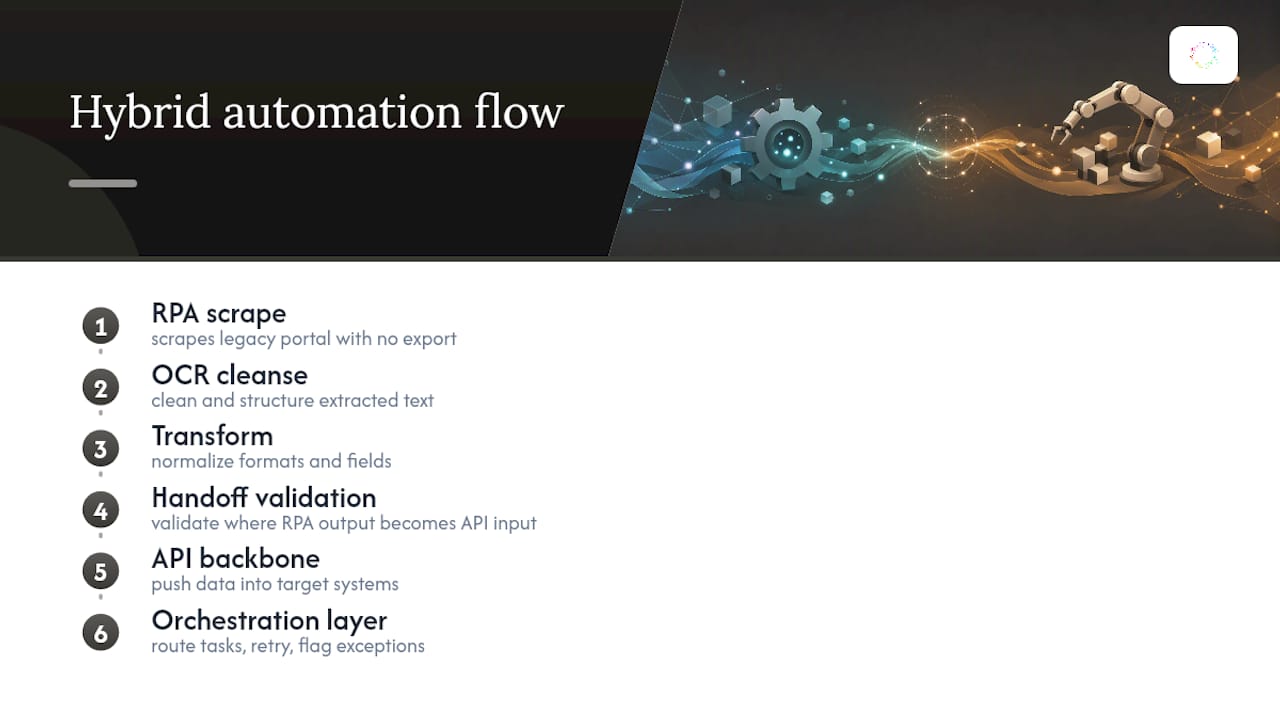
A typical flow looks like this: RPA scrapes data out of a legacy portal that has no export function, an OCR step cleans and structures that data, a transformation layer normalizes it, and then an API pipeline takes over to push it into the systems that actually need it. The handoff point, where RPA output becomes API input, is where error handling matters most. Build validation checks there, not just at the ends.
Orchestration tools that sit above both layers can route tasks intelligently, retry failures, and flag exceptions for human review instead of letting a broken step fail silently downstream. Tools built around this kind of layered automation, including options covered in this overview of AI automation platforms, increasingly treat RPA and APIs as complementary pieces of the same stack rather than competing choices.
Avoiding Technical Debt: Governance That Actually Matters
Most automation failures aren’t dramatic. They’re a login that expired, a field that moved, or a version bump nobody flagged. Test for these specifically rather than assuming stability.
-
Version your APIs and track every consumer that depends on a given version.
-
Rotate and vault credentials instead of hardcoding them into bot scripts.
-
Set up monitoring that flags silent failures, not just crashes.
-
Log RPA runs at the session level so you can reconstruct what happened during an audit.
-
Revisit any RPA workflow every six to twelve months to check whether an API has since become available.
Pro Tip: Keep a running list of every RPA process currently in production, ranked by fragility and business impact. That list becomes your migration roadmap the moment an API-first alternative shows up.
Where Orchard Fits in the API vs RPA Decision
The API-versus-RPA decision starts with understanding the work to improve. Orchard helps teams investigate employee activity, software usage, repeated effort, and slow handoffs across the supported systems in their chosen scope.
Use Isaac to explore the evidence and Studio to compare relevant patterns. Treat those findings as input to an integration assessment: verify API availability, permissions, exceptions, and implementation costs with the process owner. Review Orchard’s Trust page when assessing data handling.
The Pragmatic Take on Tool Choice
The API vs RPA debate gets treated like a religious argument when it should be an engineering one. Run the capability analysis, measure actual time-to-value, and plan the migration path before you commit. Automation work rewards people who track outcomes, not people who pick a side.
— Katie
Explore Your Automation Candidates With Orchard
Orchard helps teams explore where work repeats and how activity moves across applications. Those observations can inform a shortlist of workflows to investigate for API integration, RPA, process redesign, or a combination.

For supported workflows your team chooses and enables, Orchard can track completed automations and estimate time saved and labor-capacity value. These estimates do not establish financial ROI by themselves. Request an Orchard briefing to discuss the systems, evidence, and evaluation scope needed for your decision.